
Learn about suppressed email profiles in FosterFlow, including what they are, the different categories of suppressions, and how these profiles are updated within your account.
What is a suppressed profile?
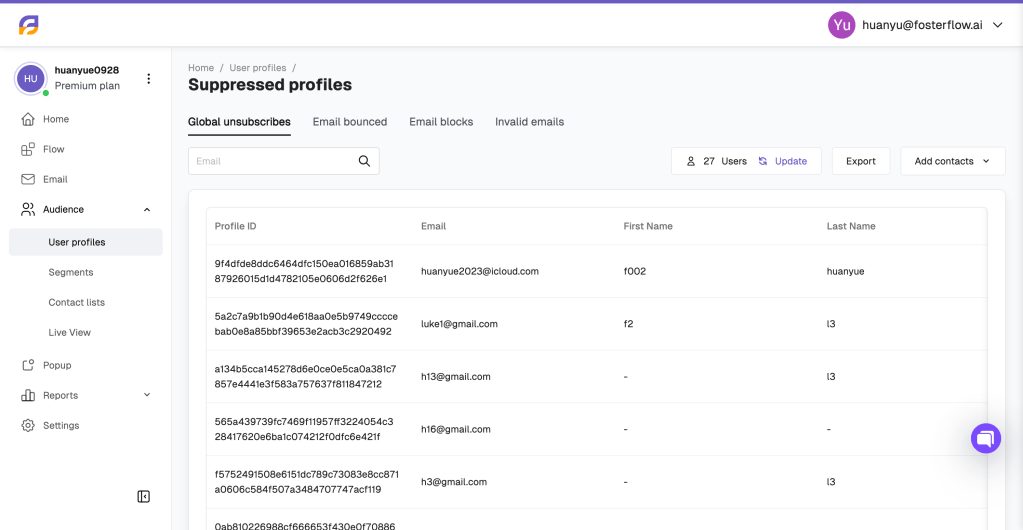
When a profile is suppressed for email, the associated contact cannot receive marketing messages. A suppressed profile will automatically be excluded from your email sends, even if the contact previously provided consent and indicated that they want to receive emails.
Maintaining a clean list of suppressed profiles is essential for preserving your sender reputation and ensuring high deliverability rates. In FosterFlow, suppressed profiles are categorized into specific groups based on the reason for their suppression.
Global unsubscribes
When a customer unsubscribes from one of your emails, they expect to stop receiving all marketing communications from you. In FosterFlow, when someone explicitly unsubscribes, they are added to the Global unsubscribes list. This means they are globally suppressed across your account and will not receive any further email campaigns or automated flows. Honoring these unsubscribes is crucial to avoid having your emails marked as spam, which can significantly harm your deliverability.
Email bounced
A bounce indicates that an email could not be successfully delivered to the recipient’s inbox. Profiles are suppressed under the Email bounced category for the following reasons:
- Hard bounce: This occurs when an email cannot be delivered due to a permanent reason, such as a misspelled email address or a domain that no longer exists. FosterFlow automatically suppresses these profiles to keep your lists clean.
- Soft bounce: This occurs when an email cannot be delivered due to a temporary reason, such as a full inbox or a temporary server issue. If an email soft bounces multiple times consecutively, it indicates a consistent issue, and the system will suppress the address to prevent continuous delivery failures.
Email blocks
Profiles are categorized under Email blocks when the receiving email server deliberately rejects the message. This can happen for a few reasons, most notably if the recipient has previously marked an email message from your account as spam (a spam complaint). It may also occur if strict security filters on the recipient’s server block the incoming message.
Invalid emails
An email address is marked as invalid if it is structurally incorrect or improperly formatted (e.g., missing an “@” symbol or having an incomplete domain extension). Because it is impossible to deliver to these addresses, FosterFlow identifies them and automatically places them in the Invalid emails suppression list.
How suppressed profiles are updated
The suppression status of user profiles in FosterFlow is updated dynamically to ensure your audience lists remain accurate. These updates occur in two primary ways:
- System-identified updates: As you send campaigns and automated flows, the FosterFlow system continuously monitors delivery metrics in the background. If the system detects actions such as an unsubscribe, a hard bounce, repeated soft bounces, or a spam complaint during its regular operation, it will automatically update the profile’s status to suppressed.
- Manual updates via Contact Lists: If you need to manually intervene and update suppression statuses, you can do so by uploading a contact list. By selecting and uploading a CSV or XLS/XLSX file containing email data, you can manually suppress specific contacts or update existing records.
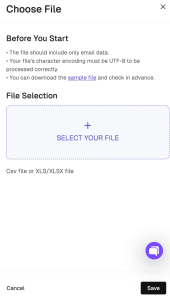
Below is an example of an XLSX file used for suppression uploads:

When manually updating through a file upload, ensure your file includes only email data so that FosterFlow can process the suppression updates correctly.