
Why Deliverability Matters
Email deliverability is the crucial measure of whether your emails actually land in your recipients’ primary inboxes, rather than getting lost in spam folders or blocked entirely. While email delivery simply means the email successfully reached the receiving mail server, deliverability determines where it is placed after it arrives.
Why is this so important? Because even the most beautifully designed campaign cannot drive engagement or sales if your audience never sees it. Maintaining strong deliverability ensures a high return on investment (ROI), builds brand trust, and protects your long-term sender reputation.
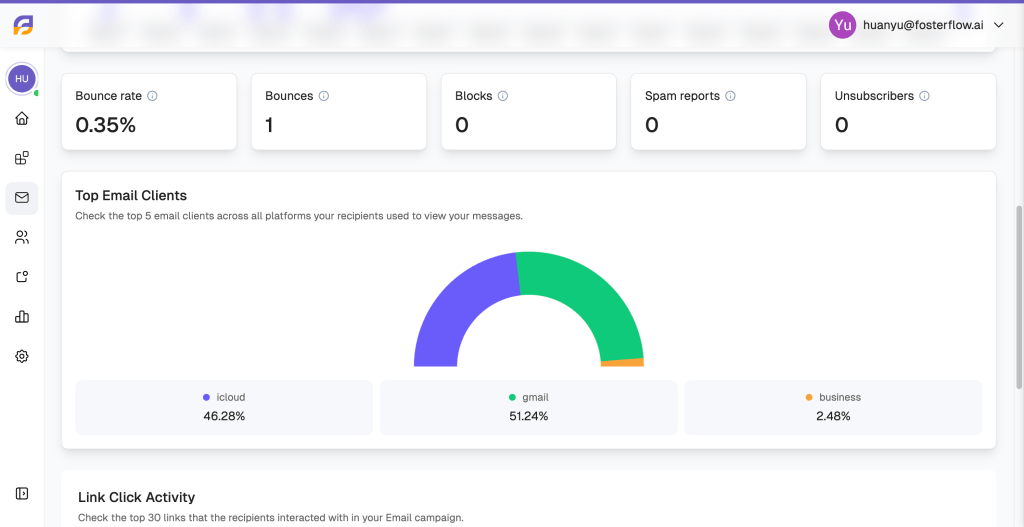
With FosterFlow, you can closely monitor the health of your campaigns. As shown below, our analytics dashboard allows you to track critical metrics that indicate real human engagement and deliverability health, such as Bounce rates, Spam reports, Unsubscribers, and your Top Email Clients (like Gmail or iCloud). Keeping a close eye on these numbers is the first step to mastering your email performance.
Deliverability Factors
Achieving excellent inbox placement relies on several interconnected factors. Inbox providers evaluate you as a sender based on your habits, audience, and infrastructure. Understanding these elements and following best practices will help you maintain a strong sender reputation.
As seen in the FosterFlow Deliverability Health dashboard above, maintaining a “Good” or “Excellent” score requires keeping specific metrics in check. Here is a breakdown of the core factors that impact your deliverability:
1. Bounces
* Meaning: A bounce occurs when an email is rejected by the recipient’s email provider. A “hard bounce” means the email address is invalid or does not exist. A “soft bounce” indicates a temporary issue, such as a full inbox or a momentary server outage.
* Impact: Consistently high bounce rates signal to mailbox providers that you have poor list hygiene, which severely damages your sender reputation and can lead to future campaigns being blocked.
* Best Practices: Regularly clean your email lists to remove invalid or inactive addresses before you send. Never purchase or rent email lists. Monitor your bounce rate within FosterFlow to ensure it stays in the “Good” range.
2. Domain Reputation & Infrastructure
* Meaning: This is a trust score assigned to your sending domain and IP address by Internet Service Providers (ISPs). It is built over time based on your sending history, volume consistency, and user engagement.
* Impact: If your domain reputation drops, ISPs will start filtering your emails directly into the spam folder.
* Best Practices: Set up a dedicated sending domain and authenticate your emails using industry-standard protocols (SPF, DKIM, and DMARC). If you are sending from new infrastructure, always “warm up” your domain by starting with small, engaged segments and gradually ramping up your email volume.
3. Contact Opt-in & Engagement
* Meaning: This refers to how your contacts joined your list and how actively they interact with your messages (opens, clicks, replies).
* Impact: Sending to users who never explicitly opted in, or who have stopped engaging, leads to low open rates and high unsubscribe rates (which, if they rise too high, require immediate attention). Worse, unengaged users are more likely to mark your emails as spam, which is highly detrimental to deliverability.
* Best Practices: Always use a double opt-in process to confirm subscriber intent. Create engaged segments in FosterFlow to target users who actively want to hear from you, and implement a “sunset strategy” to phase out unengaged profiles. Most importantly, make it very easy to unsubscribe. A frustrated user who cannot find the unsubscribe link will simply hit the spam button instead.
4. Email Content
* Meaning: Inbox providers use advanced spam filters to scan the actual content of your emails, evaluating subject lines, images, links, and formatting.
* Impact: Content that looks suspicious or unprofessional will trigger spam filters, preventing your message from reaching the primary inbox.
* Best Practices: Avoid spammy trigger words and ALL CAPS in your subject lines. Maintain a healthy balance of text and images (avoid sending emails that are just one large image). Limit the number of URLs you include, ensure your code is clean, and personalize your content whenever possible to signal to providers that you are a trusted sender.
The Bottom Line
Email deliverability is not a one-time setup, but an ongoing practice of maintaining good list hygiene, sending relevant content to opted-in users, and constantly monitoring your sender reputation. By prioritizing explicit consent, keeping your bounce and spam complaint rates near zero, and actively utilizing your FosterFlow dashboards, you can ensure your messages reach the right people at the right time. Ultimately, protecting your deliverability is protecting your revenue–it ensures your marketing efforts consistently reach the inbox and drive meaningful business results.