
Learn how to use segmentation in FosterFlow to group your audience based on their actions and profile attributes. Building targeted segments allows you to send more relevant marketing communications, helping you gain the most value from your audience.
About segments
Segments in FosterFlow are dynamic groupings of your contacts that automatically update. As users meet or fail to meet the conditions you define, they are seamlessly added to or removed from the segment.
Unlike static contact lists, which require manual updates or CSV uploads, dynamic segments adapt continuously. This makes them perfect for time-sensitive or behavioral scenarios that static lists cannot support. For example, you can use dynamic segments to automatically target users who abandoned their cart within the last 24 hours, or instantly exclude customers from a promotional campaign the moment they make a purchase.
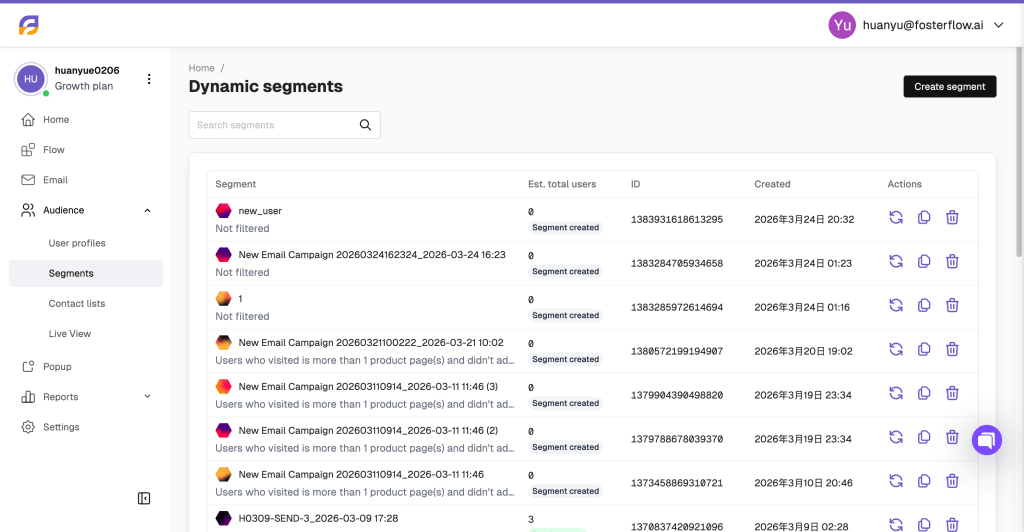
From the Segments dashboard, you can view a list of all your created segments, check the estimated number of users for each, and perform quick actions such as refreshing the user count, duplicating, or deleting a segment.
Create a segment
To build a new audience, click Create segment. You will start by selecting the segment type.
There are three ways to create a dynamic segment with conditions. Dynamic segments use variable events and attributes to evaluate users. This ensures your segment automatically adjusts itself as user statuses change.
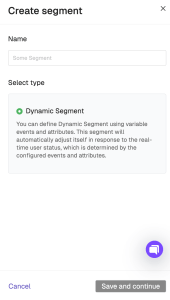
Once you select Dynamic Segment, you will be prompted to build your targeting rules using three main condition categories:
1. Standard Conditions
Build your segment from scratch using fundamental data points. You can filter users by purchasing history, browsing behavior, user attributes, specific events, or their reachability on various channels.

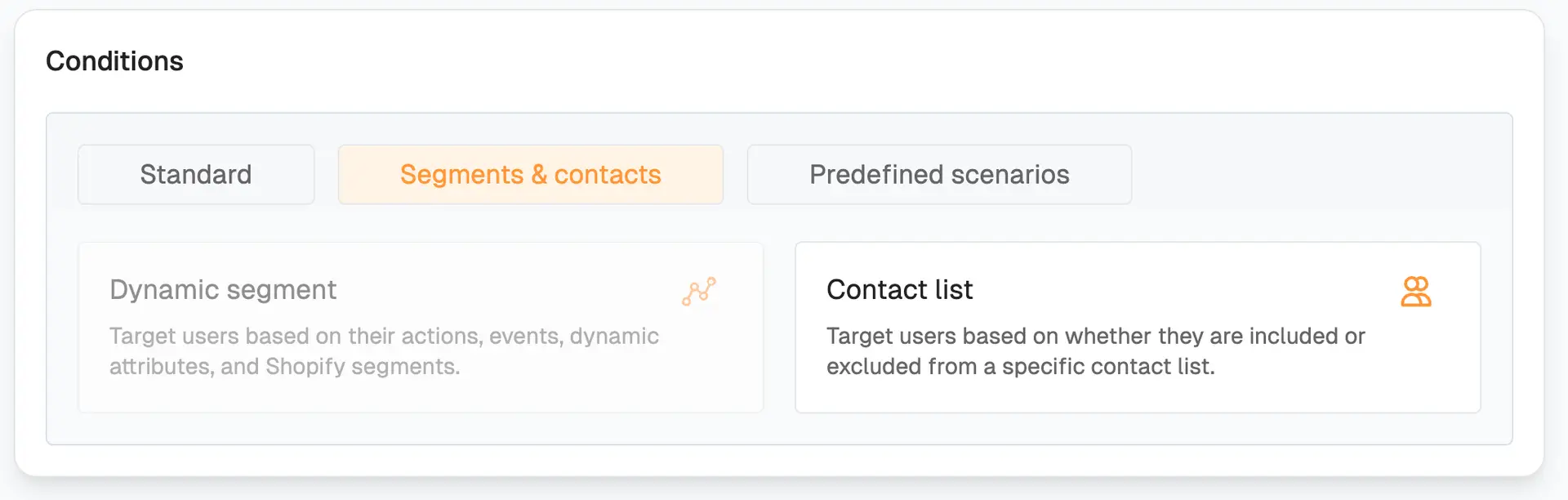
2. Segments & contacts
Create nested segments by targeting users based on whether they are already included in another dynamic segment or a specific static contact list.
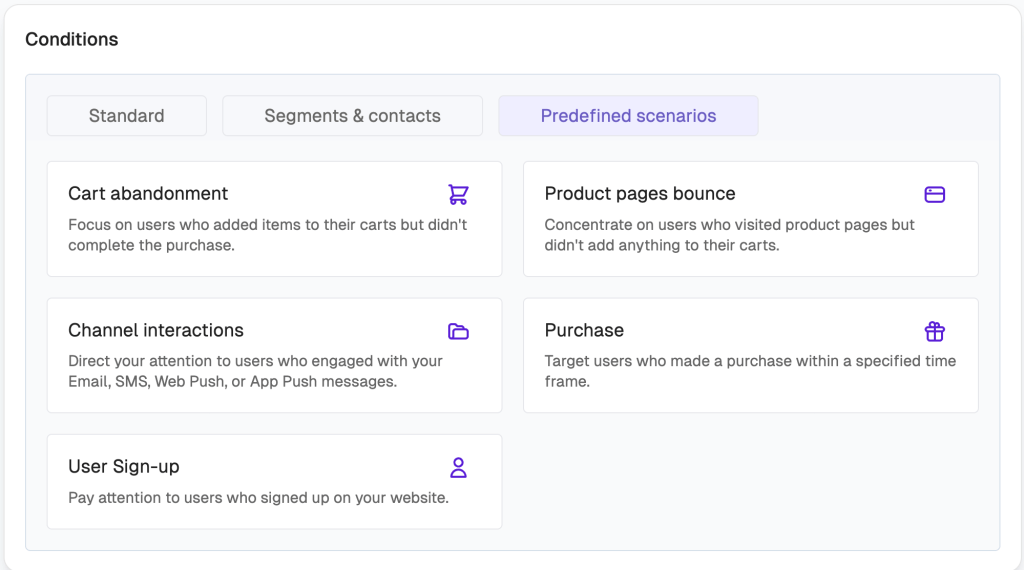
3. Predefined scenarios
Save time by utilizing FosterFlow’s built-in templates for common marketing scenarios. You can instantly generate conditions for cart abandonment, product page bounces, channel interactions, purchases, or user sign-ups.
Segment conditions
Using events to create a segment is one of the most powerful ways to target users. You can define the specific event (e.g., “View Item”), the operator (e.g., “is more than”), the value, and the exact time range.

Event parameters allow for highly granular targeting. By clicking + Add event parameter, you can restrict the event based on specific details. For example, you can target users who viewed an item where the “Item Price” is less than a specific amount.

More conditions and condition groups
You can build complex segment rules by combining multiple data points. Use the AND/OR operators to join conditions together. For example, you can require a user to have triggered a Purchase event AND have their User Country attribute contain “US”.

You can also build additional condition groups to include or exclude other users. By clicking + Add condition group, you can evaluate separate blocks of logic. For instance, you can target users who meet your specific event and attribute criteria, OR are present in a specific static contact list.

Difference between Segments and Flows
While segments and flows work closely together in FosterFlow, they serve different purposes:
* Segments define who your audience is. They are dynamic lists of users who meet specific behavioral or attribute conditions, updating in close to real time.
* Flows define what happens to that audience. Flows are true real-time, automated customer journeys (like sending emails or showing pop-ups) that trigger the exact moment a user joins a segment or performs an action.
Segments are frequently used as the starting trigger or as internal filters within a Flow to ensure your automated messages reach the right people.
Best Practices: Creating Persona Segments Based on Activity
To get the most out of your FosterFlow segments, consider building customer persona segments based on different sets of actions. There are two types of behaviors you should look at:
- Engagement: Browsing your website, or opening/clicking your messages.
- Purchasing: How often someone buys from you, the amount they spend, and their average order value (AOV).
For both types of actions, consider recency and frequency. The definitions of recent, frequent, and monetary value should be customized for your business. Here are key persona segments you can build using FosterFlow conditions:
- High Rollers: Your best customers. They purchase often, recently, and at a high monetary value. Goal: Retain them with VIP treatment and exclusivity.
- Brand Enthusiasts: Loyal customers who purchase often and recently, but don’t spend as much as VIPs. Goal: Increase their AOV with related products or volume discounts.
- Potential High Rollers: Purchased recently and at a high monetary value, but don’t buy very often. Goal: Increase purchase frequency with replenishment flows or VIP perks.
- Nearly There: Subscribers who engage with your messages often and recently, but have never purchased. Goal: Nudge them to their first purchase by selling value or offering a first-time incentive.
- Waiting for Wows: Subscribers who have never purchased but recently engaged with at least one message. Goal: Capitalize on recent interest with limited-time deals.
- Window Shoppers: Customers who have engaged with your marketing and show intent to purchase, but haven’t made the leap. Goal: Convert them with social proof and positive reviews.
- Lapsed High Rollers & Enthusiasts: Customers who used to purchase frequently or at high values, but haven’t bought anything recently. Goal: Win them back with relevant new releases or special win-back offers.
- Dead Weight: Subscribers who haven’t purchased or engaged recently. Goal: Clear them from your active targeting to maintain healthy engagement rates.