
When building segments or configuring flow filters in FosterFlow, it is essential to understand how your data is stored and interpreted. The data types you use dictate the kinds of conditions and operators available to you when targeting your users.
FosterFlow supports four primary data types: Number, Text, Date, and Boolean. Depending on the data type assigned to an attribute or event parameter, the condition builder will automatically adapt to provide the most relevant filtering options for your specific use case.
Number
A Number data type represents numerical values. This includes data points like a user’s age, the price of an item, or the total number of times a customer has triggered a specific event.
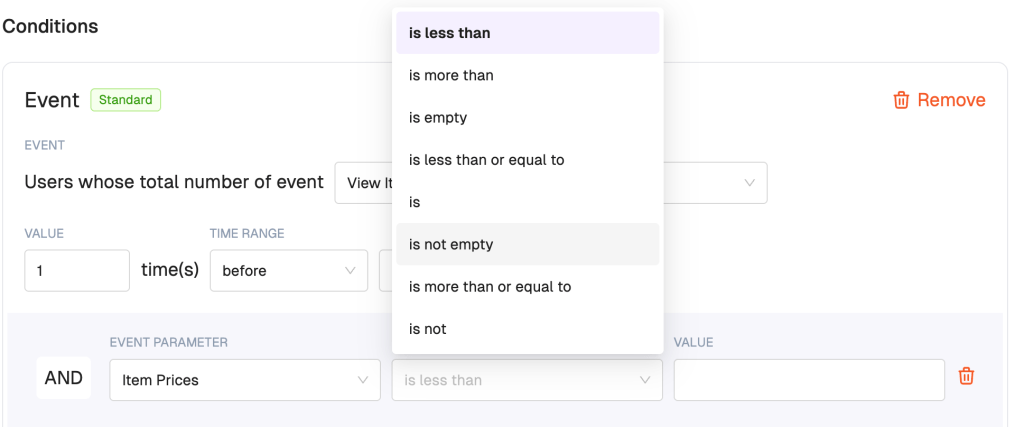
When you select an attribute or parameter that uses the Number data type, FosterFlow provides mathematical operators. As shown in the example below, when evaluating Item Prices, you can filter users based on whether the numeric value is less than, is more than, is equal to, and so on.
Text
A Text input consists of any finite sequence of characters, including letters, symbols, punctuation, and even numbers that are intended to be read as plain text (like a zip code or a phone number). Common use cases for the Text data type include user names, street addresses, or product categories.
When building a condition around a Text property, FosterFlow offers string-matching operators. For example, when evaluating Item Categories, you can segment users based on whether the text contains, is exactly, does not match, or is empty.

Date
The Date data type is used for any date or date-time value, such as a user’s Date of Birth, their account creation date, or the date of their last purchase. FosterFlow provides robust and highly flexible ways to filter date values.
When working with dates, FosterFlow offers two main types of date operators to suit different marketing scenarios:
1. Standard Date Operators
Standard date operators evaluate the complete date in time (including the year). You can use operators like is to check if a date falls exactly on the date of a specific calendar day, before or after a date, or even relative timeframes like in the last specific number of days, hours, or months.


2. Anniversary Operators
The anniversary is operator works differently: it only evaluates the month and day, completely ignoring the year. This makes it the perfect operator for recurring annual campaigns, such as sending a birthday discount or a subscription anniversary email. You can target users whose anniversary is exactly today, or a specific number of days before today or days after today.

Boolean
The Boolean data type is binary and can only represent one of two values: true or false.
Booleans are used for definitive yes/no data points. Common examples include whether a customer has accepted marketing consent, whether they are subscribed to a newsletter, or whether a specific condition is met, such as Has Valid Email being true.
