
Learn how flow branching helps you personalize your automated campaigns so that you can send individuals down different parallel paths depending on what you already know about them.
Flows allow you to automate timely touchpoints with your contacts without losing any of the relevance and personalization required to build an impactful marketing strategy. Flow branching helps you take this personalization to the next level. By creating logical splits in your customer journeys, you ensure your audience receives the right message based on their behavior, profile data, or channel interactions.
Overview
Automation branching is a vital and powerful component of FosterFlow, designed to support your most complex business logic. Instead of sending generic, one-size-fits-all messages to your entire audience, branching allows you to create dynamic, highly customized paths.
In FosterFlow, we utilize the Check components to evaluate specific criteria and split the flow accordingly. To better understand how this works, let’s walk through a specific e-commerce example using an abandoned cart flow.
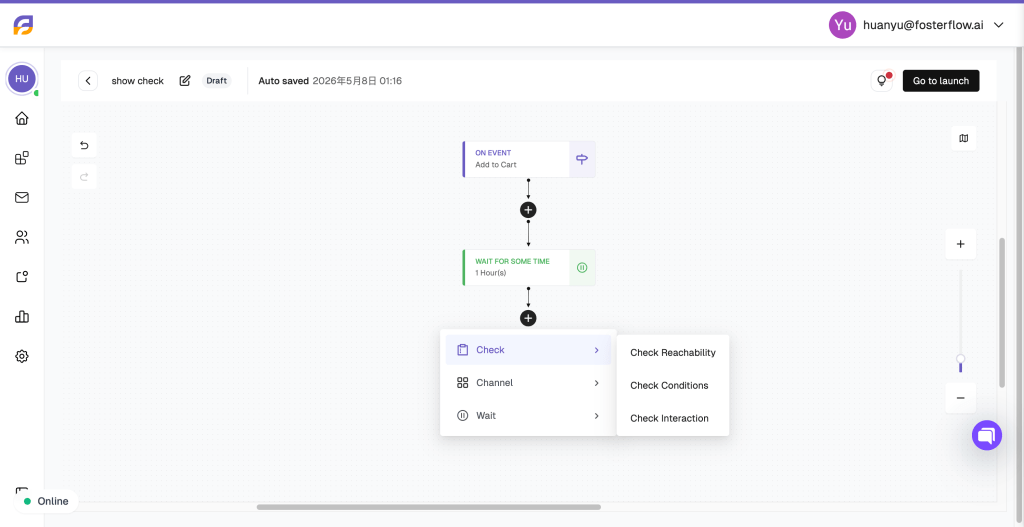
Check Conditions
The Check Conditions component is the foundational capability for audience filtering within a flow. Its setup interface uses the same logic you see when building segments and triggers. It allows you to create logical statements based on recipient profile properties and event activities.

For example, in our abandoned cart flow, a user triggers the flow via an “Add to Cart” event. After adding a “Wait” step of 1 hour, we need to determine if the user completed their purchase. We use the Check Conditions component for this.
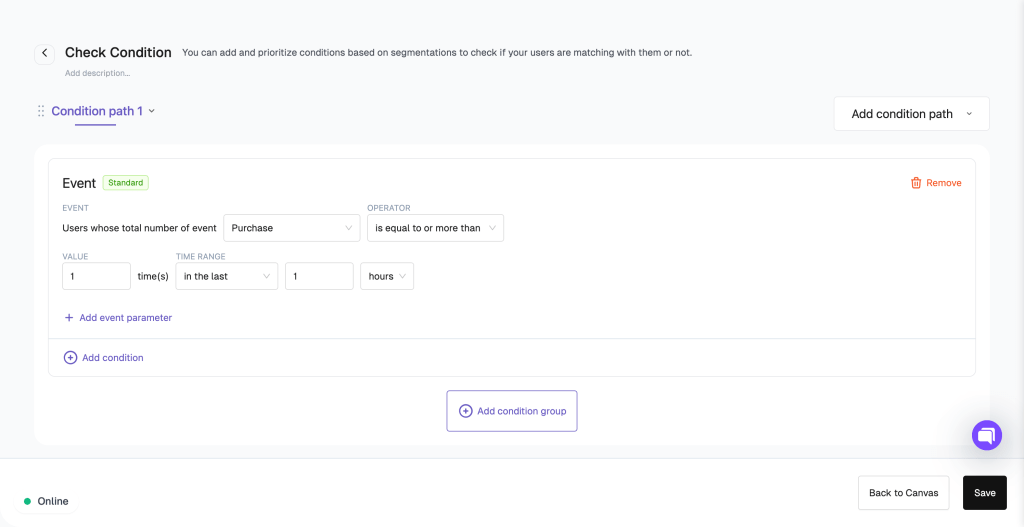
By selecting the Event option, we can set a condition to look for users whose total number of the Purchase event is equal to or more than 1 in the last 1 hour. Because we previously set a 1-hour wait delay, checking the past 1 hour perfectly aligns with the time the user spent in the flow.
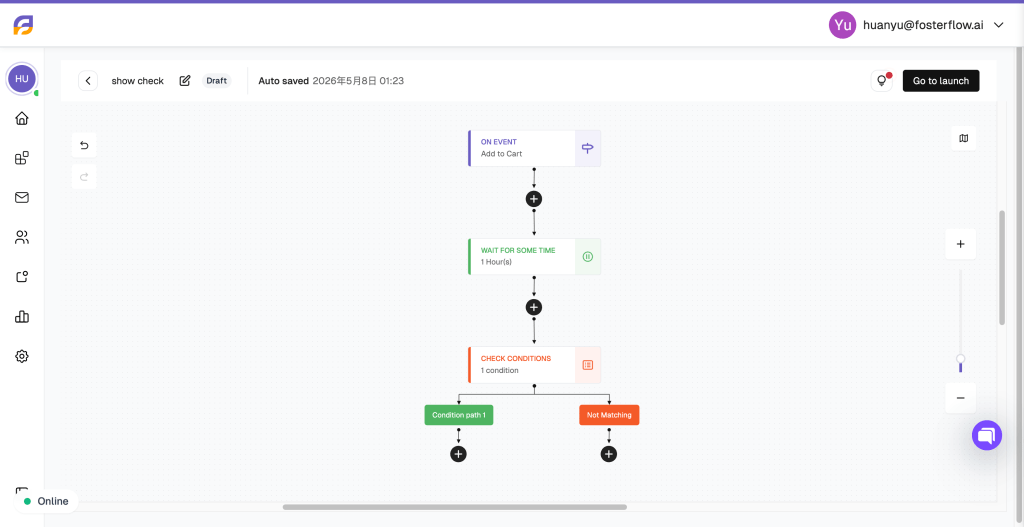
Once configured, the visual flow builder generates two distinct parallel branches:
* Condition path 1: Users who meet the definition (purchased the item).
* Not Matching: Users who do not meet the definition (abandoned their cart).
Check Reachability
Before attempting to deliver a marketing message to the users who abandoned their cart, it is important to verify that they can actually receive it on your intended channel.

Following the “Not Matching” path (users who did not purchase), we add a Check Reachability component.

We configure this step to check if the user is reachable via Email. This creates two new branches. For those who go down the “Reachable Email” path, we can confidently proceed to add an Email action, sending them a message titled “Reminder: Items in your cart have not been ordered yet.”
Check Interaction
To create a sophisticated, multi-step campaign, you need to be able to react to how users engage with the previous messages you’ve sent them. The Check Interaction component allows you to split your audience based on their direct engagement metrics.

In our abandoned cart journey, after sending the first reminder email, we add another “Wait” step for 1 day, followed by another “Check Conditions” to verify if they are still non-purchasers.
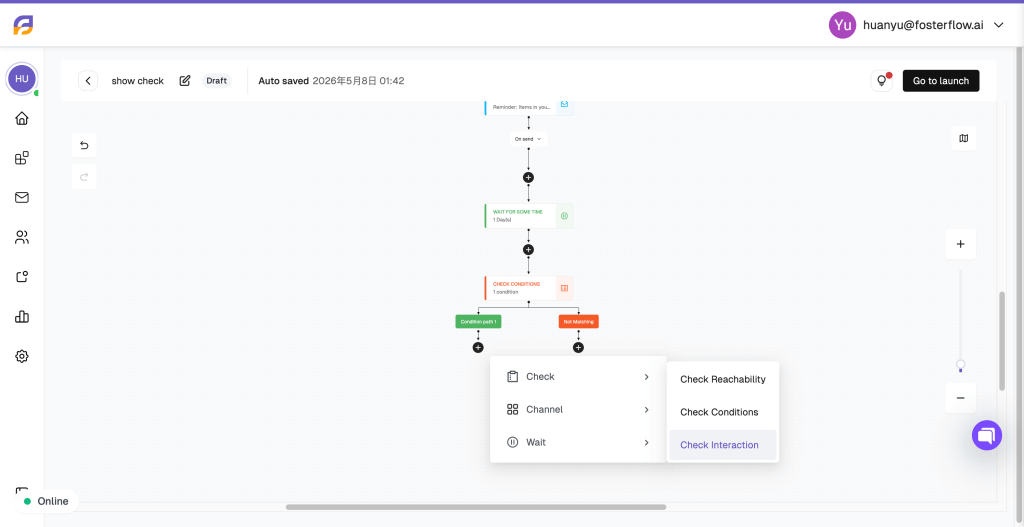
For users who still haven’t made a purchase, we want to send a second follow-up email. However, to optimize the customer experience, we want to exclude users who have already opened the first email, targeting only those who missed it.
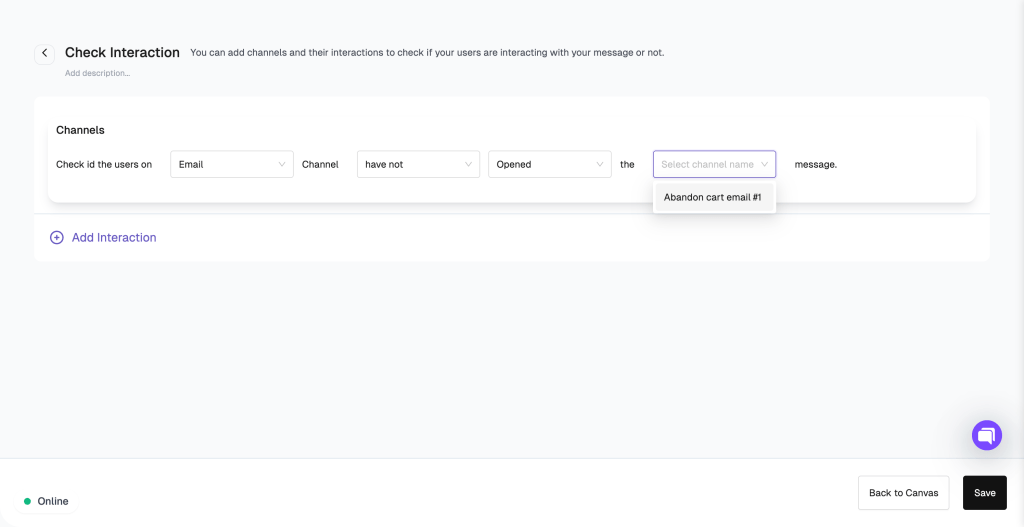
We insert a Check Interaction component and configure it to evaluate the Email channel. We set the logic to check if the users have not Opened the specific campaign “Abandon cart email #1”.
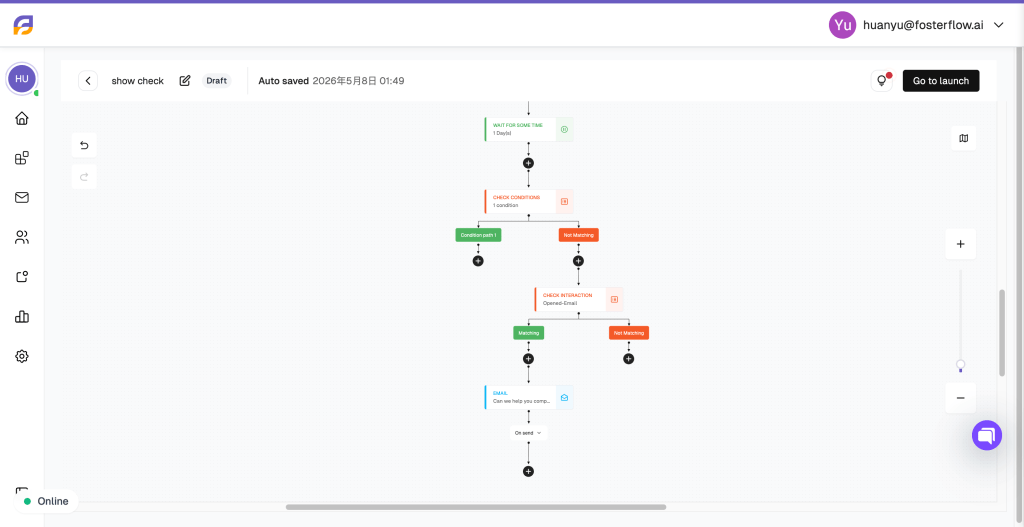
Users who match this condition (they ignored or missed the first email) will proceed down the “Matching” path to receive a second email. Those who did open the first email will go down the “Not Matching” path, allowing you to spare them from repetitive messaging or try a different approach.
Conclusion
The Check components Check Conditions, Check Reachability, and Check Interaction are essential tools for building intelligent automation within FosterFlow. By strategically placing these checks throughout your canvas, you can effortlessly handle complex e-commerce scenarios. Whether you are recovering abandoned carts, building post-purchase journeys, or targeting browse abandonment, flow branching ensures you put your data to work to drive deeper, highly personalized engagement.