
Learn about the common factors that influence your email deliverability and how to ensure your messages reach the inbox instead of the spam folder.
FosterFlow is responsible for sending your campaigns, but once these emails reach inbox providers (like Gmail or Yahoo), they are filtered according to each provider’s complex, internal algorithms. Understanding and optimizing the elements that affect your sender reputation is crucial for improving your subscriber engagement and maximizing revenue.
The Foundation of Delivery
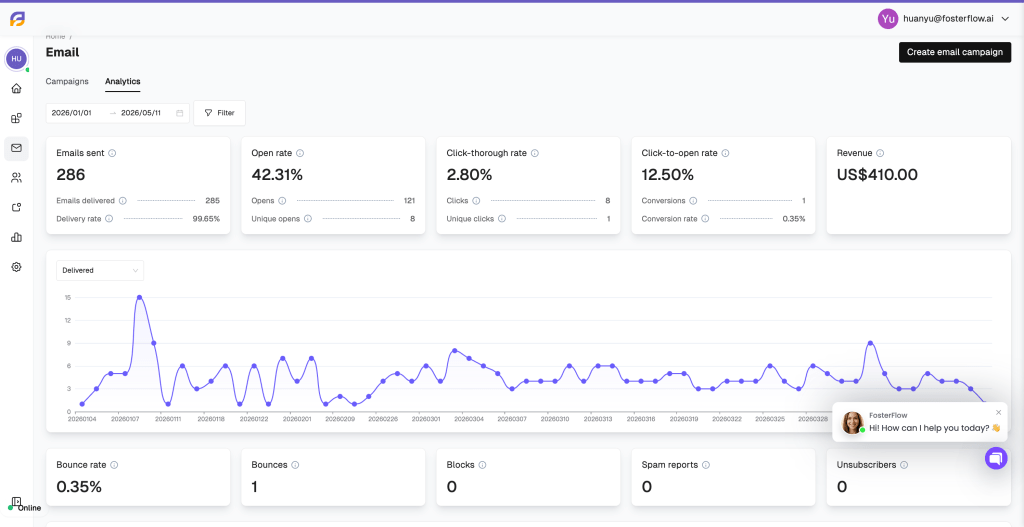
Sender reputation is the core metric inbox providers use to evaluate your trustworthiness as a brand. As shown in your FosterFlow dashboard, maintaining a high Delivery rate is the first step to success.
Behind the scenes, inbox providers evaluate various metrics for your domain and IP address. A poor sending reputation–often caused by sending to unengaged lists or poor list hygiene–can result in providers routing your emails straight to the spam folder, even if your content is highly relevant.
Volume and Consistency
When establishing your reputation, inbox providers look closely at your sending volume and frequency, represented by the delivery trend lines in your FosterFlow analytics.
Sending massive spikes of emails to a mail server in a very short time frame can trigger spam filters and result in rejections. As a general rule, sending more than one email per inbox per day is risky.
To maintain a healthy reputation:
* Strategic Volume Warm-up: When using a new domain or IP, never send at full volume immediately. Instead, use a gradual warm-up process, starting with small batches to your most engaged segments and slowly increasing volume over several weeks. This deliberate pacing allows ISPs to recognize you as a legitimate sender and establishes a positive baseline for your reputation.
* Consistent Sending Patterns: Avoid erratic spikes in volume, which can be interpreted by filters as suspicious or “spam-like” behavior. By maintaining a steady, predictable sending cadence, you demonstrate reliability to ISPs. FosterFlow’s scheduling tools can help you distribute your campaigns evenly, ensuring your reputation remains stable over time.
Managing Bounces and Hygiene
The health indicators at the bottom of your FosterFlow dashboard–Bounce rate, Bounces, Blocks, Spam reports, and Unsubscribers–require constant monitoring. Acting quickly on these metrics protects your domain.
- Bounce Rates: A bounce occurs when an email is rejected by the recipient’s provider. High bounce rates are a primary indicator of poor list hygiene. To maintain a healthy sender reputation, it is essential to keep bounces at a negligible level–typically below the 1-2% industry threshold. Consistently high rates may trigger filters and impact overall delivery.
- Spam Complaints: This is the most critical metric impacting your sender reputation. Major providers like Google and Yahoo now strictly enforce a complaint threshold of 0.1%. Exceeding this limit, or approaching the 0.3% ‘danger zone,’ can lead to your emails being automatically routed to the spam folder or blocked entirely.
- Unsubscribe Rates: High unsubscribe rates suggest that your content may no longer align with your audience’s expectations. While unsubscribes are a natural part of list churn, a sudden spike per campaign is a signal to re-evaluate your targeting or frequency. It is always better to have a visible, easy-to-use opt-out link than to risk a user marking the message as spam out of frustration.
Engagement Quality
Engagement metrics–such as your Open rate, Click-through rate, and Click-to-open rate–tell inbox providers how much recipients value your emails. High engagement proves that your emails are wanted, which solidifies your deliverability reputation.
Sending repeatedly to dormant subscribers without a “sunset policy” will severely degrade your reputation over time. If you notice your emails landing in spam, immediately use FosterFlow to create segments of unengaged users (those who haven’t opened, clicked, or purchased recently) and suppress them from your regular campaign sends.
Additional Best Practices for Optimal Deliverability
Email Content Optimization
Inbox providers use advanced spam filters to scan the actual content of your messages. To ensure your FosterFlow templates pass these checks:
* Refine Subject Lines: Avoid using all-caps, deceptive phrasing, or excessive symbols (e.g., “!!!!!”). A professional, clear subject line builds immediate trust with both the recipient and the spam filters, ensuring your message isn’t dismissed at first glance.
* Balance Images And Text: Emails composed of a single large image are high-risk triggers for filters. Aim for a balanced ratio–ideally including at least 500 characters of text–and always provide descriptive alt-text for images to ensure accessibility and content transparency
* Optimize Link Usage: Overloading your content with excessive or suspicious URLs can lead to deliverability issues. Focus on including only essential, high-quality links that guide the user toward a clear call-to-action, reducing the complexity of the email’s underlying code.
* Utilize Advanced Personalization: Leverage user profile fields to address recipients by name and tailor the message to their attributes. By integrating FosterFlow’s personalized product recommendations, you provide highly relevant content that drives engagement and proves to ISPs that your emails are valuable to the user.
Authentication and Industry Requirements
Major providers like Gmail and Yahoo enforce strict sender requirements. To ensure your emails are authenticated:
* Set up a Branded Sending Domain: This gives you full control over your sender reputation and aligns your “from” address with your actual domain.
* Implement a DMARC Policy: Ensure your root domain has a valid DMARC policy set up in your DNS provider (e.g., GoDaddy, Cloudflare) to protect against spoofing.
* Never use free webmail addresses: Always use a website domain you own for your friendly “from” address, rather than @gmail.com or @yahoo.com.