
How to Audit Shopify Email Flows: Entry, Handoffs, Exits, and Send Checks

You open the automation screen and see a Welcome Flow, three recovery Flows, two post-purchase sequences, a review request, Replenishment, and Winback. Every Flow is switched on. That still does not tell you whether the right customer receives the right message.
A Shopify email Flow audit should verify seven decisions for every Flow:
- Customer job: What is the person trying to understand, finish, or resolve now?
- Entry evidence: Which current event, consent, identity, order, product, or service facts qualify the profile?
- Handoff: Which newer or deeper state should give another path ownership?
- Exit or reset: What ends this job, and what starts a later episode?
- Send-time eligibility: Which facts must still be true before each message leaves?
- Runtime evidence: Can the team see whether the system sent, waited, skipped, exited, or transitioned, and why?
- Outcome and guardrails: Which result belongs to this Flow, and which complaints, unsubscribes, refunds, support issues, or offer costs must remain visible?
This checklist focuses on lifecycle decision logic. A complete email-program audit may also review authentication, sender reputation, list health, legal requirements, template rendering, accessibility, and campaign performance. Keeping those scopes clear makes the findings easier to act on.
If the store's symptom begins earlier—Shopify traffic is arriving but few or no orders follow—start with Shopify Traffic but No Sales? Find the First Broken Step. Confirm the traffic, offer, product-page and checkout path before assigning Email a lifecycle job.
Step 1: Map the Flow Inventory Without Treating It as the Strategy
Most Shopify teams can name the usual candidates:
- Welcome
- Browse Abandonment
- Abandoned Cart
- Abandoned Checkout
- Post-purchase
- Review Request
- Cross-sell
- Replenishment
- Winback
- VIP
- Back-in-stock
- Price drop
That list is useful. It helps a team find gaps, assign owners, and locate the relevant automation in the platform. It is an inventory, not proof that the customer journey works.
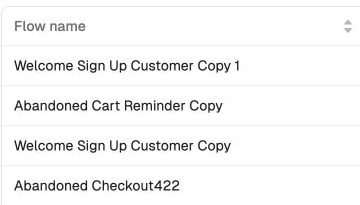
For each item, record whether it is a lifecycle path, a transactional service message, a branch inside another Flow, a customer treatment such as VIP, or a catalog event such as Back-in-stock. This avoids counting the same customer job several times under different names.
Then look for collisions before adding gaps:
- Can a buyer remain in Welcome after the first purchase?
- Can Browse, Cart, and Checkout recovery contact the same shopper for one episode?
- Can a review request or cross-sell run while delivery or support is unresolved?
- Can Replenishment and Winback both activate because they use unrelated timers?
- Can Shopify, an email platform, and another app send competing versions of the same message?
An absent Flow can leave a useful job uncovered. Two overlapping Flows can create a worse problem by sending contradictory or excessive messages. Audit both conditions.
Use templates as scenario prompts, not store policy
Flow templates reduce setup effort. They also carry assumptions about the store, customer, product cycle, offer, and available data.

A template name can help the operator choose a starting canvas. It should not silently decide:
- that every store needs a separate Browse, Cart, and Checkout sequence;
- that every Welcome path should lead with a coupon;
- that a review request deserves its own Flow rather than a post-purchase branch;
- that Replenishment applies to durable goods;
- that one lapse window defines Winback;
- that a VIP label is useful without a stable cohort and real benefits.
Before copying a template, write a short Flow contract. These seven fields are also the core of this Shopify email Flow audit:
| Field | Decision to record |
|---|---|
| Customer state | What has just happened? |
| Customer job | What are they trying to understand, finish, or resolve? |
| Evidence | Which current facts support the decision? |
| Message action | What useful next step will the email provide? |
| Handoff | Which new state gives another path ownership? |
| Exit or reset | What ends this job or starts a new episode? |
| Observation | Which send, wait, skip, exit, and outcome evidence will be reviewed? |
The contract turns a template into a merchant-specific decision path.
Step 2: Audit the Decisions Shared by Every Flow
Open one Flow and trace a real or controlled test profile from qualification to the last possible action. Do not stop at the canvas.
Verify entry with current evidence
The trigger says what happened. Entry rules decide whether that event is enough to start this path. Confirm the event belongs to the correct profile, product, cart, order, and shopping episode. Then check consent, channel reachability, suppression, and any product or service facts the message requires.
Customer segment eligibility can be one input to that decision. Segment membership alone should not replace current event, order, or consent checks when those facts determine whether the message is valid.
Define handoff separately from entry
A customer can change state while a Flow is waiting. A purchase may transfer the person from recovery to post-purchase. A support issue may pause a cross-sell. A new subscription should not erase an active order state.
Write the handoff explicitly: which newer state takes ownership, whether the old path exits or pauses, and whether the new path must qualify independently.
Recheck before every consequential send
Passing entry once does not authorize every later message. Before dispatch, re-evaluate the facts that could make the message wrong: purchase, cancellation, refund, delivery, inventory, price, consent, reachability, support state, contact pressure, competing journeys, and event freshness.
Use distinct outcomes:
- Send: every required fact remains valid.
- Wait: an authoritative state is still processing or temporarily ambiguous.
- Skip: this message is invalid, while a later action may still be evaluated.
- Exit: the customer job has ended for this episode.
- Transition: another path may now qualify independently.
Inspect runtime evidence, not only configuration
A line on a canvas proves that a decision was configured. The audit also needs execution evidence: which version ran, which profile entered, which facts were evaluated, what decision was recorded, and when the evidence was current. Without that record, describe the finding as a configuration review rather than a runtime result.
Step 3: Audit Welcome Against the Signup Promise
What the customer needs
A new subscriber needs to know what they signed up for and whether the store is relevant. They may be waiting for a guide, product alert, availability update, or offer. They may also need help comparing products or trusting a store they have not purchased from.
What often goes wrong
The signup form makes one promise, while the first email immediately starts a generic promotion. The next two emails repeat the same coupon with more urgency. The series has no useful work left once the incentive stops changing.
Build the message around the source
Match the first message to the acquisition source:
- A guide signup should deliver the guide before adding a commercial ask.
- A product alert should explain what the subscriber will be notified about.
- A considered purchase may need use cases, comparison help, shipping, warranty, assembly, sizing, or support information.
- An existing buyer should not receive the same first-purchase treatment as a person who has never ordered.
Offers can still be part of the sequence. They should serve the signup promise and customer decision rather than replace them.
Keep opt-in and Flow entry observable
Single and double opt-in affect confirmation friction and evidence strength. Double opt-in usually leaves a smaller but more strongly confirmed list. Single opt-in can be appropriate where applicable requirements allow it and the source, consent evidence, and abuse controls are strong. Neither setting guarantees engagement, inbox placement, or sales.
For troubleshooting, follow each state:
- Valid form submission
- Confirmation requested and completed when applicable
- Consent evidence stored against the correct profile
- Intended list membership
- Welcome Flow entry
- Message waiting, sent, or skipped with a reason
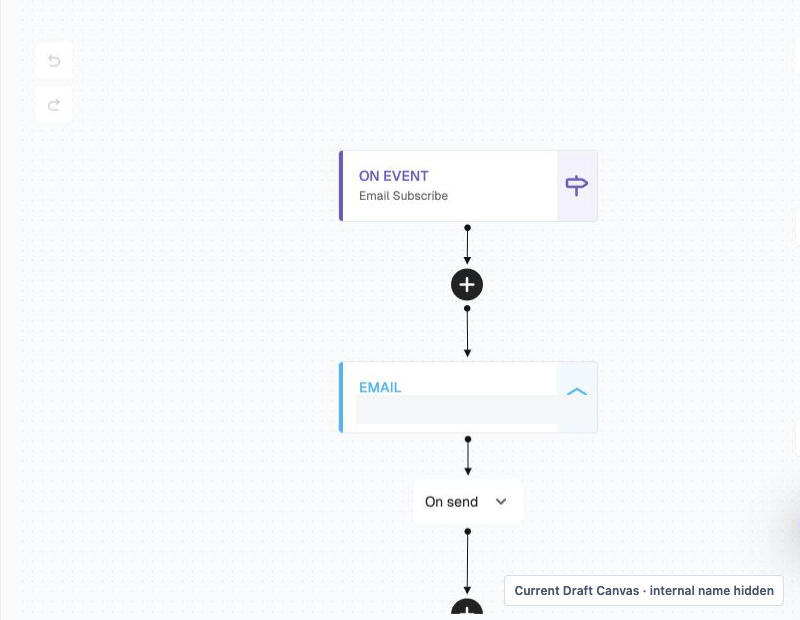
The image shows a point-in-time draft configuration. It does not prove current launch, complete consent handoff, runtime, delivery, or merchant results.
Define the handoff
Product interest may justify a more relevant branch. Purchase ends the first-purchase job and should move the customer to post-purchase service. Lost consent, an unreachable address, or a conflicting current state should block the next promotional action.
Audit question: If the customer purchases after the first Welcome email, does the rest of the sequence still make sense?
Step 4: Audit Abandonment Against Current Shopping State
What the event actually says
Viewed Product, Added to Cart, and Began Checkout describe progress. They do not explain why the person stopped.
Possible causes include natural comparison, delivery uncertainty, shipping cost, trust, account requirements, payment failure, a page problem, or simple lack of readiness. Baymard’s research is useful for forming a diagnostic checklist, but it is not one store’s cause mix and does not predict recovery from email.
Give the shopper a useful path
An abandonment message can:
- return to the relevant product, cart, or checkout step;
- restate accurate item and cart facts;
- answer a concern that the store has evidence for;
- wait when the identity, episode, product, or current state is ambiguous.
It should not assume that every pause needs a discount.
Let deeper intent own recovery
Within one correlated shopping episode:
Browse -> Cart -> Checkout -> Purchase
Cart takes ownership from Browse. Checkout takes ownership from Cart. Purchase ends recovery. The deeper path still needs to qualify independently before contact.
This is the portfolio-level version of the more specific problem covered in How to Stop Abandoned Cart Emails After a Shopify Customer Purchases. That guide focuses on purchase exit and per-send checks; this audit checks whether all recovery paths agree on ownership.
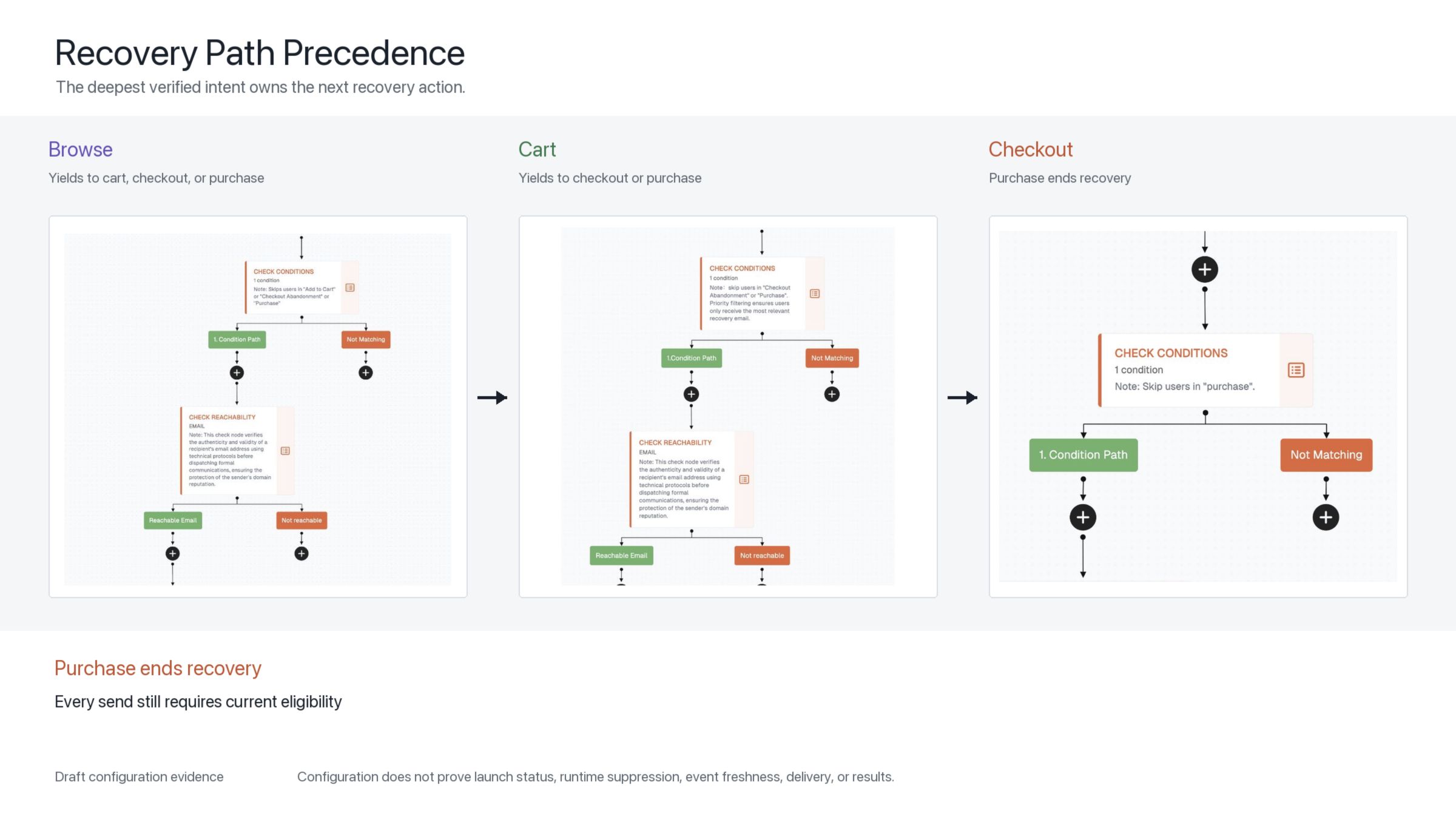
The canvas view shows where ownership checks sit. The condition view shows the excluded deeper events and the later purchase recheck.
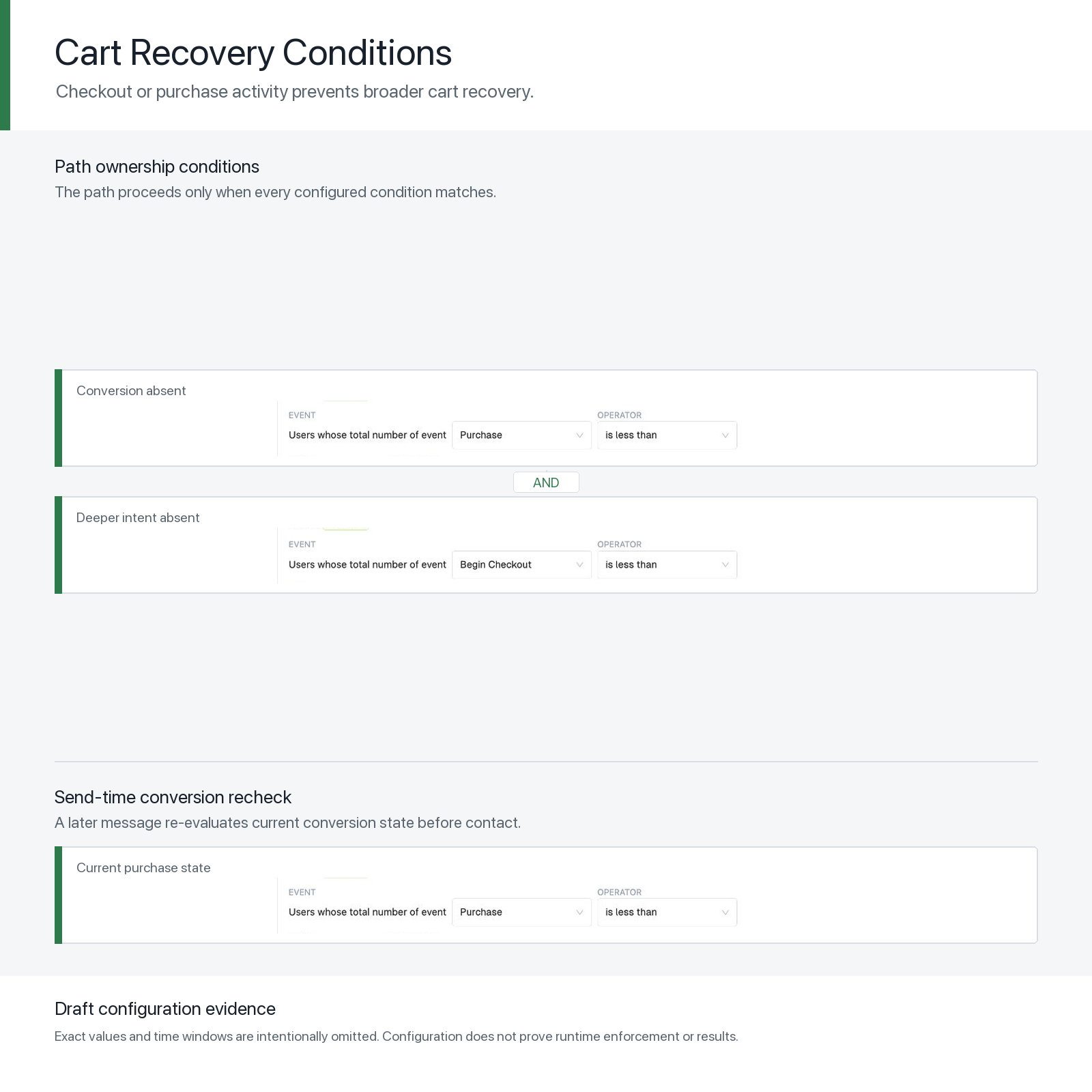
Both images are draft configuration evidence. They do not prove that live events are fresh, correlated, or enforced, and they do not establish delivery or performance. Wait windows, thresholds, incentives, and message counts remain store decisions.
Audit test: Put a new profile into recovery, purchase before a later email, and verify the recorded skip or exit reason.
Step 5: Audit Post-Purchase Against Order and Service State
Post-purchase is not a single upsell sequence. It contains several possible jobs:
- order and payment confirmation;
- fraud or risk verification;
- shipping and delivery updates;
- setup, assembly, sizing, care, or use guidance;
- warranty, support, return, or exchange help;
- review request after enough product experience;
- a later related-product or replenishment decision.
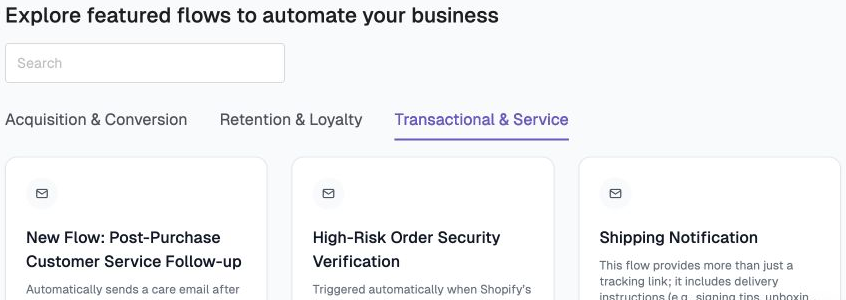
The service message and the marketing message may occur during the same stage, but they do not have the same responsibility. Keep the source facts, consent context, and purpose clear.
Common sequencing failures
- A review request arrives before delivery.
- An assembly or care guide arrives too early to remember or too late to help.
- A cross-sell appears before the customer can use the first product.
- A promotion continues while a return, delivery problem, or support case is unresolved.
The fix is not simply “send less.” Use the actual order, fulfilment, delivery, product, and service state to choose the next job.
Design the transitions
Purchase qualifies post-purchase evaluation. Order state determines confirmation and exception handling. Fulfilment and delivery determine when setup help becomes useful. Product experience can later qualify review. A related-product recommendation should support the customer’s use case and current order rather than trigger for every buyer of one item.
Cancellation, refund, return, failed delivery, or unresolved service may pause or replace the commercial path.
Audit question: For every post-purchase email, would the customer recognise the state the message assumes?
Step 6: Audit Replenishment and Winback Against a Real Return Reason
A fixed delay is easy to configure. It is often a weak description of need.
Consumables, replacement parts, accessories, seasonal products, and durable goods have different cycles. Two customers may use the same product at very different rates.
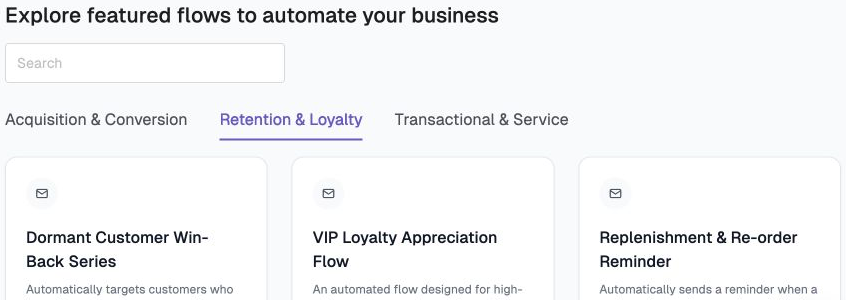
Use the best evidence available:
- Product or category consumption, maintenance, or replacement cycle
- Comparable customer history when enough reliable orders exist
- A wider cohort window with explicit lower confidence
Then recheck the current order, inventory, consent, reachability, recent behaviour, other active paths, and contact pressure.
Reaching an estimated due window means the profile can be evaluated. It does not require a send.
Winback needs a reason, not only a date
A relevant need, a meaningful product change, a resolved objection, or a genuinely new benefit can support re-engagement. “We miss you” does not automatically help the customer.
An absent open is weak evidence of lapse, especially when privacy protections make open data ambiguous. A historic open is also weak evidence of present interest. New purchase or meaningful activity should reset the old path.
Audit test: Sample ten Winback entries. Write the evidence for “why now” beside each profile. A timer alone is not a complete answer.
Step 7: Separate a Designed Email From a Working Flow
Email production deserves its own quality review. Copy should be clear. Product and offer facts should be accurate. Links, mobile layout, accessibility, and brand details should work.
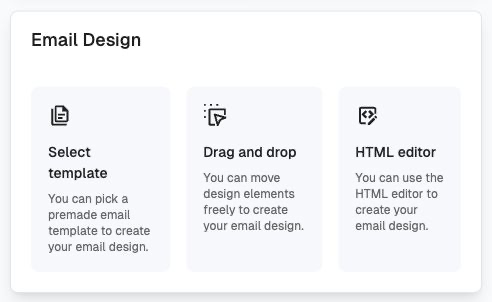
That is one evidence layer. Keep four review scopes separate:
1. Message artifact
Review copy, product claims, links, offer details, design, mobile rendering, and accessibility.
2. Flow configuration
Review trigger, entry eligibility, waits, branches, path precedence, per-send checks, exits, and re-entry.
3. Observed runtime
Review what the current version actually sent, waited, skipped, exited, or handed off, including the reason and evidence time.
4. Outcome
Review the selected result for the eligible population together with unsubscribes, complaints, refunds, discount cost, and other relevant economic or relationship guardrails.
If the team only has designed emails, call the work a message review. If it only has a Canvas, call it a configuration review. Neither alone proves launch, current execution, delivery, or business impact.
How to Prioritize Shopify Email Flow Audit Findings
An audit should produce a repair order, not a longer inventory. Group findings by the consequence of leaving them unresolved.
Fix customer harm and invalid contact first
Start with broken consent or unsubscribe handling, unreachable or suppressed recipients, inaccurate prices or offers, security and account issues, and messages that continue after purchase, cancellation, refund, or another decisive state change.
Fix ownership and state errors next
Resolve competing recovery paths, Welcome messages that survive purchase, premature review requests, cross-sells during unresolved service, and stale Winback or Replenishment entries. These are structural defects. Better copy will not make the assumed customer state accurate.
Restore observability before optimizing
If the team cannot explain why a profile entered, waited, skipped, exited, or received a message, repair the evidence path before comparing subject lines or attributed revenue. Otherwise, the team may optimize around a reporting artifact or an unknown execution state.
Then improve relevance and production quality
Once the path is valid and observable, review the promise, answer, proof, product facts, CTA, links, rendering, accessibility, and brand consistency. This is where copy, design, and testing can improve a message that is already reaching an appropriate customer.
When several Flows remain eligible for improvement, compare:
- eligible customer volume;
- customer and economic importance;
- visible friction or stale-state risk;
- data and consent readiness;
- ability to define a useful next action;
- ability to observe send, wait, skip, and exit decisions;
- ability to measure a job-appropriate outcome and guardrails;
- learning that can be reused in other paths.
One merchant may start with Welcome because acquisition is high and the signup promise is broken. Another may start with recovery because purchased customers still receive cart reminders. A third may fix post-purchase first because support and delivery questions are overwhelming the team.
Build order should follow the current business problem and evidence, not a universal ranking.
Copy This Shopify Email Flow Audit Worksheet
For one existing Flow, record:
- State: What has just happened?
- Job: What is the customer trying to finish?
- Evidence: Which consent, identity, event, order, product, inventory, or service facts support the decision?
- Unknowns: Which explanations remain hypotheses?
- Action: What useful next step does the email provide?
- Entry: Why should the profile start this path?
- Handoff: Which deeper or newer state takes ownership?
- Exit or reset: What ends the job or starts a later episode?
- Runtime: Can the team see every send, wait, skip, and exit reason?
- Outcome: Which business result and relationship guardrails will be reviewed?
- Priority: What happens if the finding remains unresolved, and what evidence supports that severity?
- Owner and retest: Who will fix it, and which controlled path will prove the change?
Then compare the answers with Designing the Customer’s Next Step, Stopping Abandoned-Cart Emails After Purchase, Message Eligibility for Shopify Customer Segments, and Building Customer Relationships With Email Automation. Each page owns a narrower supporting question; this page owns the portfolio audit.
Start with one Flow. Make its job, evidence, handoff, and exit explicit before adding another email.
Shopify Email Flow Audit FAQ
What should a Shopify email Flow audit include?
For each Flow, verify the customer job, entry evidence, handoff, exit or reset, send-time eligibility, runtime decision record, and outcome with guardrails. A broader email-program audit should also cover authentication, sender reputation, list health, compliance, rendering, accessibility, campaign practices, and measurement.
Which Shopify email Flow should I audit first?
Start with the path creating the clearest customer or business risk. A purchased customer still receiving recovery email is more urgent than a weak subject line. If no harmful error is visible, use eligible volume, economic importance, data readiness, observability, and the ability to run a controlled retest to choose the first Flow.
How often should ecommerce email Flows be audited?
Use a recurring review cadence that fits send volume and operating risk, and trigger an additional audit after material changes to consent, sending infrastructure, Shopify or email-platform integrations, checkout, catalog structure, pricing, fulfilment, support routing, or Flow logic. There is no universal interval that makes every store current.
Does a Flow canvas or screenshot prove that the automation works?
No. A canvas can prove that visible triggers, conditions, waits, and actions were configured at a point in time. Runtime proof requires current execution records. Delivery and business impact require separate evidence.
Product Evidence Note
The FosterFlow screenshots in this article are approved public-safe, point-in-time product views. The Flow inventory and template categories were captured read-only from the controlled demonstration environment; the Welcome, recovery, condition, and Email Design views reuse canonical knowledge-base assets.
They support discussion of visible names, categories, configured paths, conditions, and message-production modes. They do not prove current launch status, complete runtime enforcement, event freshness, delivery, merchant performance, or a universal lifecycle portfolio.
After the lifecycle audit is stable, use How to Measure Shopify Email Performance Beyond Open Rate to follow the same eligible population from runtime decisions through credible action, orders, attribution, profit, and relationship guardrails.
References
- Shopify Help Center: Marketing automations
- Shopify: How to audit email marketing
- Klaviyo Help Center: Getting started with flows
- Klaviyo: The complete checklist to audit your flows
- Baymard Institute: Ecommerce checkout usability report and benchmark
- Lemon and Verhoef: Understanding Customer Experience Throughout the Customer Journey