
How to Build Dynamic Shopify Customer Segments for Message Eligibility

Start with the decision, not the segment name
Many Shopify stores begin segmentation by naming familiar groups: engaged subscribers, VIP customers, lapsed buyers, product viewers, or non-buyers.
Those labels can help organize a report. They do not yet answer the question that matters when a campaign or Flow is about to run:
Who is eligible for this message now?
A working segment should change at least one action. It should determine whether a customer receives a message, waits, enters a different Flow, or is excluded. If membership changes nothing, the segment is probably descriptive rather than operational.
Define five inputs before building conditions
1. Contact eligibility
Separate the facts that are often collapsed into one field:
- A customer record exists.
- An email address exists.
- The address is reachable.
- The person has not unsubscribed or produced a relevant complaint state.
- The contact has the appropriate permission or other applicable basis for this message.
These checks belong at the beginning of the audience definition, not after the campaign has been assembled.
2. Current lifecycle state
Use the state that matters for this message. A new subscriber, a product browser, a recent purchaser, and a repeat buyer may share the same profile record while requiring different actions.
Avoid turning lifecycle names into permanent identities. Membership should change when the underlying facts change.
3. A recent, relevant signal
Choose the event or condition that creates a reason to act now:
- Viewed a relevant product or category.
- Added an item to cart.
- Completed an order.
- Revisited after a defined period.
- Selected an explicit preference or goal.
Treat signal strength honestly. A purchase is a stronger fact than an inferred interest. A lack of clicks is an absence of observed clicks, not proof that the customer has no interest.
Treat opens as supporting evidence as well. Apple Mail Privacy Protection can load remote email content without human engagement, and Google cautions that low open rates alone do not establish an inbox-placement problem.
4. The job of the message
Write one sentence that explains what the customer should gain from the contact. Examples include comparing options, completing a checkout, using a purchased product, discovering a relevant complement, or deciding whether to remain subscribed.
This prevents a segment from becoming a convenient justification for another promotion.
5. Timing and competing journeys
Check whether the customer is already in a higher-priority path or has recently received a related message. Entry rules should not ignore the rest of the lifecycle system.
Detailed exit and suppression logic deserves its own review. At the segment level, the immediate goal is to avoid admitting someone whose current state already makes the message obsolete.
Build a condition set that can explain itself
Shopify’s segmentation model uses filters, operators, values, and time-related customer facts. The most useful segment is not necessarily the most granular one. It is the one an operator can explain and maintain.
In FosterFlow’s audience segmentation workflow, the real Segment Builder exposes purchasing behavior, visiting behavior, attributes, events, and channel reachability as starting condition families.
The predefined Product page bounce scenario then turns one operating idea into a reviewable rule: people who visited more than one product page, did not add an item to cart, fall inside a selected time range, and can be narrowed by a collection parameter.
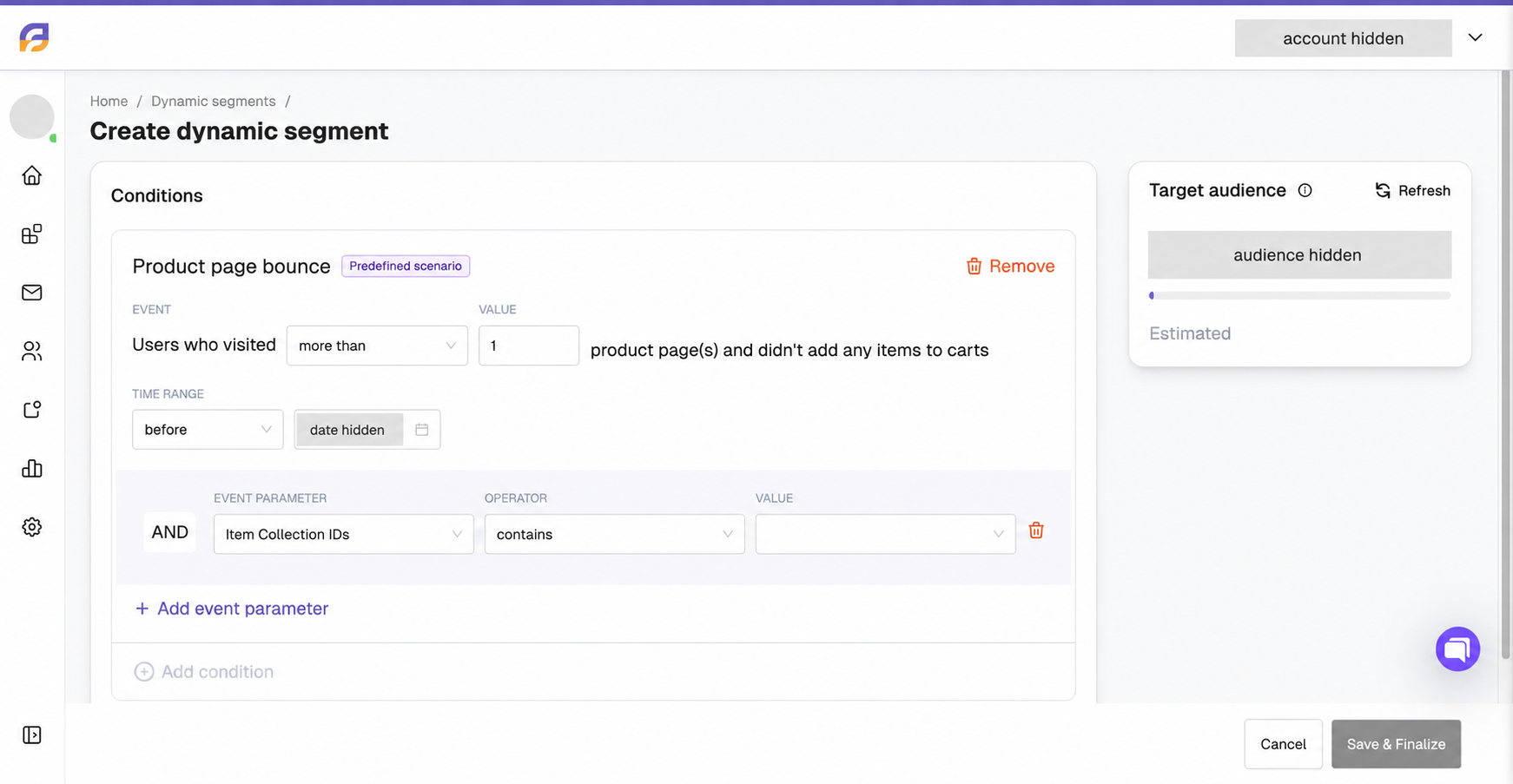
The interface says no cart addition, not no purchase. It demonstrates condition structure, not performance. A production audience would add the contact, permission, reachability, purchase-state, and competing-journey checks required for that merchant’s message.
Three Shopify examples
Product viewers who have not purchased
Message job: help the shopper decide.
Useful conditions: relevant product or category view, no subsequent purchase, recent-enough behavior, channel eligibility, and no conflicting recent-buyer state.
Avoid: assuming every viewer wants a discount or treating one page view as strong intent.
Customers who recently purchased
Message job: support the purchase and the customer’s next useful step.
Useful conditions: confirmed order, product/category context, reachable channel, and an appropriate time window.
Avoid: leaving the customer in browse or cart-recovery audiences after conversion.
Repeat buyers with no recent order
Message job: determine whether a reminder, replenishment message, education, or no action is appropriate.
Useful conditions: order count, actual order dates, product/category cycle, recent site behavior, and current contact eligibility.
Avoid: calling every customer lapsed after the same fixed number of days. Shopify’s order-count and last-order-date fields can define cohorts; they do not predict the next order by themselves.
Use a segment contract
Before activating an audience, record:
- The campaign or Flow job.
- Required conditions.
- Wait and exclusion conditions.
- The relative time window.
- Events that add or remove a customer.
- The outcome and relationship-risk metrics.
- The date the logic will be reviewed.
The contract makes the segment understandable to the next operator and gives an AI-assisted workflow a bounded decision to evaluate.
Eligibility is one part of a working automation. Use the Shopify email Flow audit checklist when the review also needs to cover customer job, path handoff, exit or reset, per-send checks, runtime evidence, and outcome guardrails.
Do not segment for its own sake
A broad audience can be appropriate when every eligible customer shares the same message job. More granular segments are useful only when customer state, behavior, timing, or evidence changes the treatment.
Keep hard ineligibility separate from temporary inactivity. Unsubscribed, invalid, complained, or otherwise suppressed contacts do not belong in ordinary promotional recovery. A still-eligible customer with no recent signal may need lower pressure, a bounded re-permission decision, or continued observation.
When comparing audiences, review total qualified outcomes and value per eligible recipient together with bounces, unsubscribes, complaints, suppression, and margin. A higher engagement rate after shrinking the denominator is not automatically a better business result.
Once message eligibility is stable, use How to Measure Shopify Email Performance Beyond Open Rate to follow the same eligible segment through send decisions, credible actions, Shopify outcomes, attribution, profit, and relationship guardrails.
Before Adding Another Shopify Segment, Review One Real Audience
Take the largest campaign audience in your store. Do not add new tags yet. Ask which customers should receive the message, which should wait, which should be excluded, and which do not have enough evidence for a decision.
That review usually reveals whether the real constraint is contact quality, lifecycle state, behavior data, message purpose, or timing. Segmentation becomes useful when it exposes and improves that decision.
One thought on “How to Build Dynamic Shopify Customer Segments for Message Eligibility”