
Win-Back & Re-engagement
This win-back and re-engagement flow is designed for customers who have gone quiet after previously showing interest or making a purchase. It uses a softer sequence of emotional copy, new product updates, and a welcome-back incentive to rebuild attention. A longer fatigue window keeps the cadence respectful and helps protect sender reputation.
When to Trigger?
|
Setting
|
Value
|
|---|---|
|
Trigger Type
|
Inactivity segment
|
|
Trigger Condition
|
No purchase or email engagement in 90–180 days
|
|
Who enters
|
Previously active customers who have gone silent
|
|
When it fires
|
When the inactivity threshold is reached
|
|
Fatigue control
|
180-day block — cannot re-enter within 180 days of last attempt
|
|
Exit condition
|
Customer makes a purchase OR re-engages (opens/clicks)
|
Trigger logic:
The 90-day entry point reaches customers while the relationship may still be recoverable. Waiting too long can make the win-back message feel disconnected from their original interest. FosterFlow re-entry control helps avoid repeated outreach to people who remain disengaged, supporting both customer experience and email deliverability.
Core Focus (Notes)
Use these notes to keep the flow relevant, easy to understand, and aligned with the customer experience.
Emotional Copy Opens Better Than Promotional Copy
The first win-back email should reconnect before it sells. A subject line such as “It has been a while” can feel more human than an immediate discount. Save the incentive for Email 2 so the first message rebuilds interest instead of sounding desperate.
Show What's New — Customers Left for a Reason
If a customer stopped engaging, they may need a fresh reason to look again. Email 2 should highlight genuinely new products, improved services, or updates that matter to their past behavior. Make the message about what has changed, not just what is on sale.
The 'Welcome Back' Incentive Must Feel Earned
Frame the incentive as a welcome-back gesture, not a plea. “We saved something special for when you are ready to return” feels more premium than simply asking the customer to come back for a discount.
List Hygiene After Email 3
If a customer completes all three emails with no opens, clicks, or purchases, tag them as dormant_unengaged and reduce normal campaign frequency. This protects sender reputation while leaving room to re-evaluate the customer later.
Personalize by Last Purchase Category
Personalize the product showcase when possible. A customer who last bought menswear should not receive a generic message about unrelated products. Even basic category personalization can make a win-back email feel more relevant.
Flow Architecture

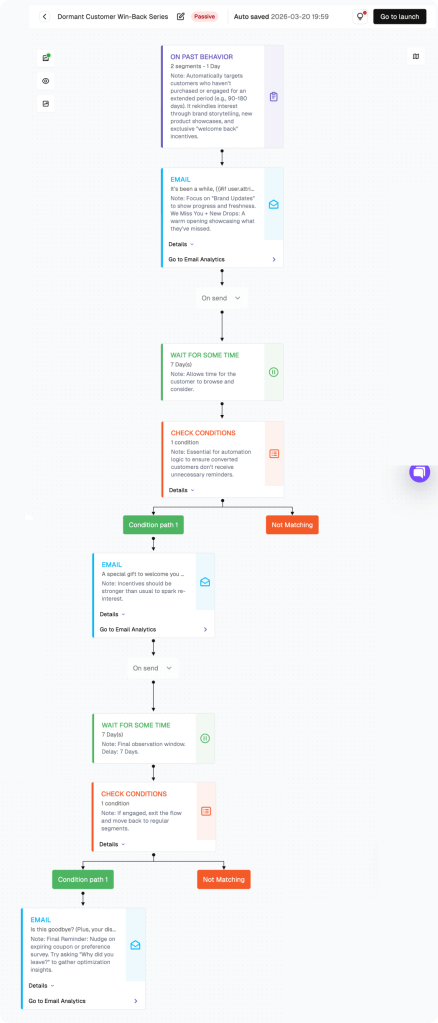
How to build this flow:
Use the steps below to build the flow in FosterFlow. Complete account setup and Shopify connection first if needed.
Navigate to the Flow Section
Click “Flow” in the left sidebar. Click “Create flow” to start a Win-Back flow.
Configure the Trigger: Inactivity Segment
Set the trigger around inactivity, such as last order date more than 90 days ago and last email engagement more than 90 days ago. Use FosterFlow purchasing and engagement conditions to define the audience.
Add 180-Day Re-entry Condition
Check: Has this customer entered this win-back flow within the last 180 days? If yes — exit. Prevents over-messaging of permanently disengaged users.
Configure Email 1: Emotional Re-connection
Campaign name: Win-Back Email 1. Subject: “It has been a while” or “We miss seeing you here.” Lead with warmth, brand story, or a relevant update. Do not include the discount in Email 1.
Add 5-Day Wait + Engagement Condition
Add a 5-day wait. Check: Has the customer opened, clicked, or purchased? If yes — exit. If no — continue to Email 2.
Configure Email 2: New Products + Incentive
Campaign name: Win-Back Email 2. Subject: “A lot has changed — and we saved something for you.” Feature relevant new products or updates, then include a clear welcome-back incentive.
Configure Email 3 + List Hygiene + Launch
After another five-day wait, send Email 3 with a final gentle offer and a clear pause message. Tag non-responders as dormant_unengaged after the sequence, then click Go to launch.
PERFORMANCE & REVIEW
Core KPI Dashboard
After launch, review performance in FosterFlow to understand how the flow is affecting opens, clicks, replies, and conversions.
|
Metric
|
What it tells you
|
Target benchmark
|
|---|---|---|
|
Send Count
|
Total win-back emails sent
|
Tracks lapsed customer volume
|
|
Open Rate — Email 1
|
Emotional re-connection open rate
|
≥ 18% (cold audience)
|
|
Open Rate — Email 2
|
New product + incentive open rate
|
≥ 15%
|
|
Re-engagement Rate
|
% who open or click any email in the sequence
|
10%–20%
|
|
Recovery Purchase Rate
|
% who make a purchase during the flow
|
3%–7%
|
|
Dormant Tag Rate
|
% tagged as dormant after no response
|
Track for list hygiene
|
Where to find it: open Flow, select the flow name, then review metrics in the list view and canvas header.
PERFORMANCE & REVIEW
Review Dimensions
Use these checks after the flow has collected at least two weeks of data.
Open rate on Email 1 below 12%?
The audience may be too lapsed — tighten the entry to 60 days instead of 90
Test subject lines: emotional (‘Is it something we said?’) vs. curiosity-based (‘We have something for you’)
Check deliverability — lapsed customers may have changed email addresses
Good email 1 engagement but low Email 2 conversions?
The product showcase in Email 2 may not match their purchase preferences — personalize by category
The welcome-back incentive may not be compelling enough — test 15% vs. 10%
High dormant tag rate?
Expected for a win-back flow — this is healthy list hygiene
If over 70% are being tagged as dormant, consider tightening the entry threshold
A/B test ideas:
|
Element
|
Variant A
|
Variant B
|
|---|---|---|
|
Email 1 subject
|
'Is it something we said?'
|
'It's been a while — we miss you'
|
|
Email 2 incentive
|
15% welcome-back discount
|
Free shipping + small gift
|
|
Email 3 framing
|
'Final offer'
|
'We'll give you some space — but here's one last thing'
|
|
Entry threshold
|
90 days inactive
|
120 days inactive
|
Summary
The Win-Back and Re-engagement Flow helps recover lapsed Shopify customers with a respectful three-stage sequence: reconnect emotionally, show what is new, and close with a final incentive. Customers who still do not respond are handled with list hygiene to protect long-term deliverability.
Key outcomes:
· Triggers after 90+ days of inactivity with a 180-day re-entry block
· Email 1: emotional reconnection — brand storytelling, no discount
· Email 2: new products relevant to their history + welcome-back incentive
· Email 3: final offer + sunset messaging for the truly disengaged
· Automatic dormant tagging for non-responders to protect sender reputation
Once configured, this FosterFlow email automation runs in the background, helping your team send timely customer messages without rebuilding the flow each time.
Ready to set this up?
Head to FosterFlow (fosterflow.ai), choose the matching Shopify email flow template, and tailor the copy to your brand voice.
3,000 total emails, up to 1,000 contacts, and no time limit.