
Replenishment & Repurchase
This replenishment and repurchase flow reminds customers when a product is likely to be running low. Based on an estimated usage cycle, it makes reordering easier with a clear reminder, a simple reorder path, and an optional loyalty reward. For consumable products, this Shopify email automation can protect customer lifetime value and reduce churn.
When to Trigger?
|
Setting
|
Value
|
|---|---|
|
Trigger Type
|
Time-delayed from Order Placed
|
|
Trigger Condition
|
Order placed for a consumable/replenishable product
|
|
When it fires
|
X days after purchase (based on product consumption cycle)
|
|
Cycle options
|
30 days / 60 days / 90 days — set per product
|
|
Fatigue control
|
No re-entry within the defined consumption cycle
|
|
Exit condition
|
Customer places a replenishment order
|
Trigger logic:
Trigger timing should match the real consumption cycle of each product. A 30-day skincare product may need a reminder before day 30, while a 90-day supplement should wait longer. FosterFlow can support product-based timing so customers receive replenishment emails when they are genuinely useful.
Core Focus (Notes)
Use these notes to keep the flow relevant, easy to understand, and aligned with the customer experience.
Match the Trigger Timing to the Consumption Cycle
Send the replenishment reminder shortly before the customer is likely to run out. Too early feels unnecessary; too late gives them time to buy elsewhere. For many products, five to ten days before the estimated depletion date is a strong starting point.
One-Click Replenishment Is the Core Conversion Driver
The main barrier to repurchase is friction. Include a direct Reorder now button or pre-filled cart link for the exact product the customer bought before. The easier the reorder path, the more effective the replenishment email becomes.
Incentive Tiers by Repurchase Count
Reward repeat purchases in a way that feels progressive. For example, the first repurchase may receive a small discount, a later repurchase may receive free shipping, and a loyal customer may receive a sample. This makes repeat buying feel recognized rather than routine.
Use New Product Mentions as a Secondary Hook
Add new or seasonal product mentions below the replenishment CTA, not above it. Customers are already thinking about restocking, so this is a good moment to introduce related products without distracting from the main reorder action.
Dynamic Timing Based on Order History
If customer purchase history shows a different reorder rhythm, use that behavior when possible. A customer who usually buys every 45 days should not be forced into a generic 30-day reminder. Behavior-based timing makes the flow feel more personal.
Flow Architecture
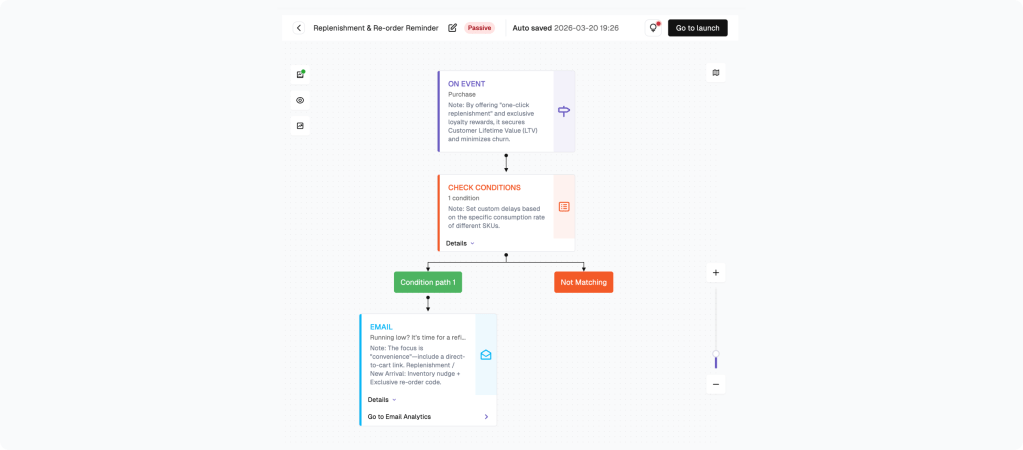
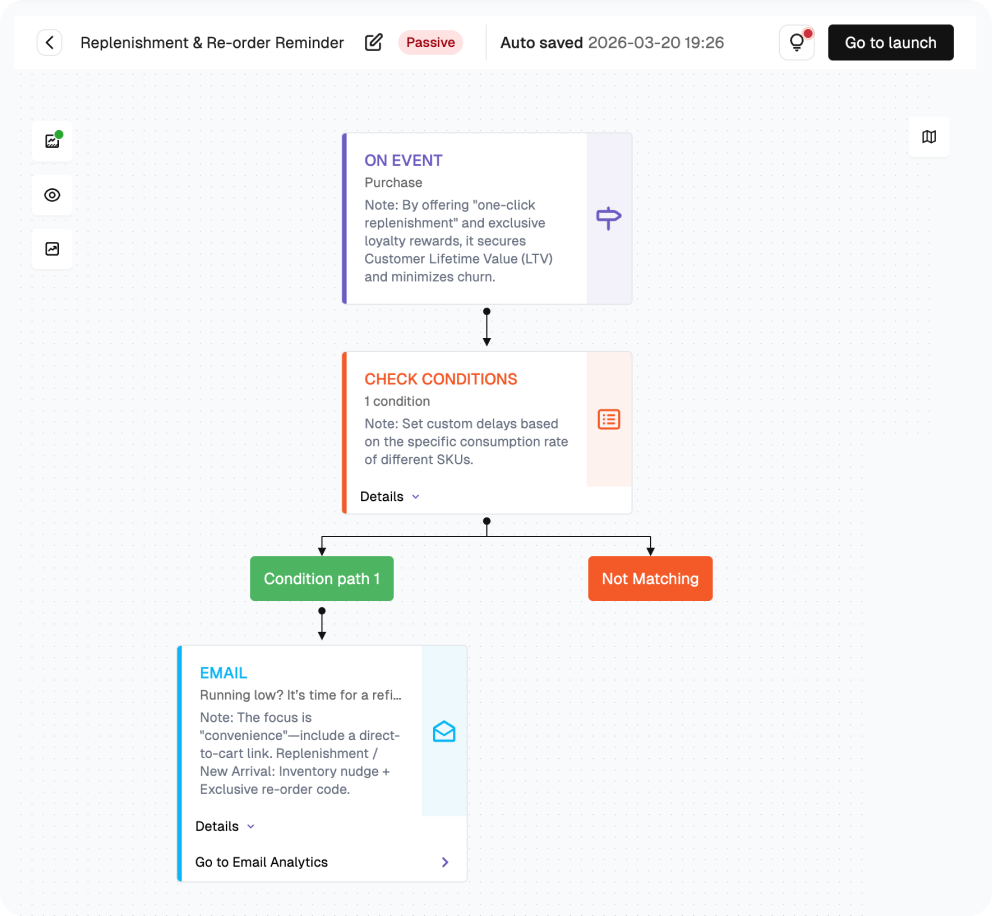
How to build this flow:
Use the steps below to build the flow in FosterFlow. Complete account setup and Shopify connection first if needed.
Navigate to the Flow Section
Click “Flow” in the left sidebar. Click “Create flow” to start a Replenishment flow.
Configure the Trigger: Order Placed — Product Filter
Set the trigger to Order Placed and filter for replenishable or consumable products. If products have different usage cycles, create separate flows or branches so each reminder matches the product timeline.
Add Wait: Consumption Cycle Minus 5 Days
Add a wait node based on the product cycle. For a 30-day product, try 23 to 25 days. For a 60-day product, try 53 to 55 days. The goal is to arrive before the product runs out.
Add Condition: Already Repurchased?
Check: Has this customer placed another order for this product since the trigger date? If yes — exit. If no — continue.
Configure Email 1: Replenishment Reminder
Campaign name: Replenishment Email 1. Subject: “Running low? Reorder [Product Name] in one click.” Include a direct reorder link, a clear CTA, and a small loyalty benefit if appropriate.
Add 7-Day Wait + Email 2 + Launch
Add a seven-day wait, then check whether the customer reordered. If not, send a short final reminder with a slightly stronger incentive, then launch the flow.
PERFORMANCE & REVIEW
Core KPI Dashboard
After launch, review performance in FosterFlow to understand how the flow is affecting opens, clicks, replies, and conversions.
|
Metric
|
What it tells you
|
Target benchmark
|
|---|---|---|
|
Send Count
|
Total replenishment emails sent
|
Tracks consumable purchase volume
|
|
Open Rate — Email 1
|
Replenishment reminder open rate
|
≥ 40%
|
|
Click Rate — Email 1
|
One-click reorder CTR
|
≥ 15%
|
|
Repurchase Rate
|
% of recipients who reorder after Email 1
|
15%–35% (high for consumables)
|
|
LTV Impact
|
Revenue per customer over 6 months vs. non-flow customers
|
Track uplift
|
|
Churn Prevention Rate
|
% of customers who would have lapsed but repurchased
|
Track over time
|
Where to find it: open Flow, select the flow name, then review metrics in the list view and canvas header.
PERFORMANCE & REVIEW
Review Dimensions
Use these checks after the flow has collected at least two weeks of data.
Repurchase rate below 15%?
Is the one-click reorder link working and pre-filling the correct product?
Is the timing correct — are you arriving before the customer runs out?
Test arriving 3 days earlier in the cycle
High open rate but low click rate?
Is the ‘Reorder now’ CTA the first and most prominent element in the email?
Is the email mobile-optimized? Most replenishment emails are read on mobile
Strong Email 1 but low Email 2 impact?
Email 2 is a safety net — most conversions happen in Email 1
Escalate the Email 2 incentive slightly to motivate late responders
A/B test ideas:
|
Element
|
Variant A
|
Variant B
|
|---|---|---|
|
Timing
|
5 days before depletion
|
7 days before depletion
|
|
Email 1 CTA
|
'Reorder in one click'
|
'Refill your supply'
|
|
Incentive structure
|
Flat discount
|
Loyalty points
|
|
Secondary hook
|
New product mention
|
Bundle offer
|
Summary
The Replenishment Flow is a high-value retention automation for Shopify stores that sell consumable products. It reaches customers before they run out and gives them an easy way to reorder, helping protect repeat revenue that might otherwise be forgotten or captured by a competitor.
Key outcomes:
· Triggers 5–7 days before estimated product depletion
· Condition check skips customers who have already reordered
· Email 1: one-click reorder link + loyalty reward + new product teaser
· Email 2: final nudge with escalated incentive for non-repurchasers
· Immediate exit when the customer places a replenishment order
Once configured, this FosterFlow email automation runs in the background, helping your team send timely customer messages without rebuilding the flow each time.
Ready to set this up?
Head to FosterFlow (fosterflow.ai), choose the matching Shopify email flow template, and tailor the copy to your brand voice.
3,000 total emails, up to 1,000 contacts, and no time limit.