
Post-Purchase Re-engagement
This post-purchase re-engagement flow helps Shopify stores turn a completed order into the next relationship-building moment. After purchase, it sends brand appreciation and uses order-history logic to choose the right follow-up: a second-purchase incentive for first-time buyers, or a warm thank-you for returning customers. The experience feels relevant because each customer receives a message that matches their buying stage.
When to Trigger?
|
Setting
|
Value
|
|---|---|
|
Trigger Type
|
On Event
|
|
Trigger Event
|
Order Placed
|
|
Who enters
|
Any customer who completes a purchase
|
|
When it fires
|
Immediately after order confirmation
|
|
Branching logic
|
First-time buyers vs. returning customers routed separately
|
|
Fatigue control
|
365-day window checks order count
|
Trigger logic:
The flow begins when an order is confirmed. FosterFlow then checks purchase history to separate first-time buyers from returning customers. New buyers can receive a second-purchase nudge after the initial order excitement settles, while loyal customers receive appreciation-focused messaging that reinforces trust and retention.
Core Focus (Notes)
Use these notes to keep the flow relevant, easy to understand, and aligned with the customer experience.
Order Count Condition — The Segmentation Core
The order-count condition is the core of this Shopify post-purchase email flow. First-time buyers should receive a message that encourages the next order, while returning customers should receive appreciation that feels personal. This split keeps the follow-up relevant and avoids sending the same generic offer to everyone.
Timing: 24 Hours Is the Sweet Spot
A 24-hour wait gives customers time to receive the confirmation email and settle into the post-purchase experience. Sending the follow-up too quickly can feel pushy; waiting too long loses momentum. Start with 24 hours, then test based on your product type and buying cycle.
First-Time Buyer Email: Make the Offer Irresistible
For first-time buyers, the goal is to make the second order feel easy and worthwhile. Offer a clear next-step incentive, early access, or a loyalty invitation that connects naturally to the product they just bought.
Returning Buyer Email: Authenticity Over Promotion
For returning customers, appreciation is more effective than another hard promotion. Thank them for coming back, acknowledge their loyalty, and keep the message warm. A genuine thank-you can build more long-term value than an immediate discount.
Subject Lines by Segment
First-time buyer subject example: “Thanks for your first order — here is something for next time.” Returning buyer subject example: “Welcome back — we are glad you chose us again.” Keep both subject lines warm, specific, and easy to understand.
Flow Architecture

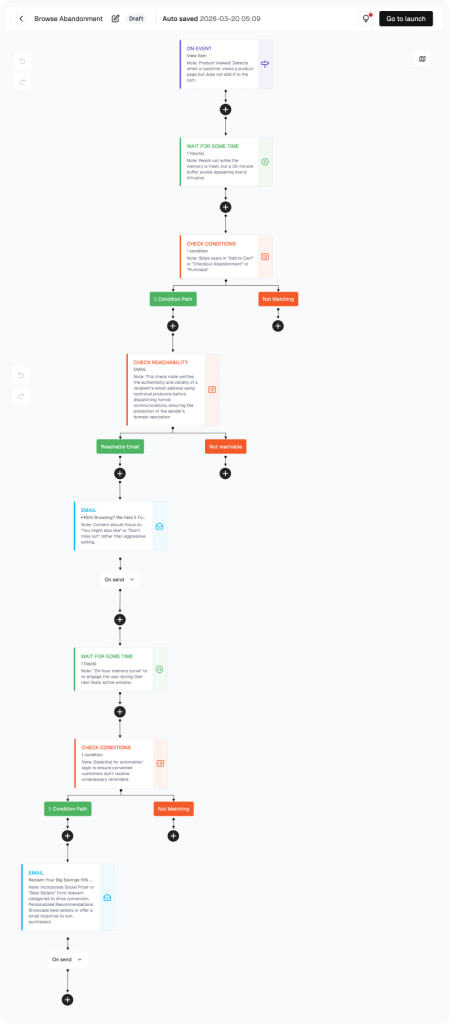
How to build this flow:
Use the steps below to build the flow in FosterFlow. Complete account setup and Shopify connection first if needed.
Navigate to the Flow Section
Look at the left sidebar in FosterFlow. Click on “Flow.”
You will land on the “User flows” tab. This page lists all your flows. Each flow shows: Flow name, Flow ID, Status (Draft, Active, or Paused), Channels used, Start and end dates, Send count, Open rate, and Click rate.
You may see a default flow called “Welcome Sign Up Customer Copy 1” with a Draft status. You can open and edit this one. Or click “Create flow” in the top right corner to start fresh.
Open the Flow Canvas
Click the flow name to open the visual canvas. You will see nodes connected by arrows representing each automation step.
Configure the Trigger: On Event — Order Placed
Click the trigger node. Set Trigger Type to “On Event” and select “Order Placed.” This fires for every completed purchase with no delay.
Add Email 1: Order Confirmation + Brand Message
Configure the first email node. Campaign name: Post-Purchase Email 1. Subject: “Your order is confirmed — here is what happens next.” Keep the tone warm and helpful, with the order details easy to find.
Add a Wait Step: 24 Hours
Click the wait node. Set to “Wait for Some Time” — 24 hours. This gives the customer time to receive and enjoy the order confirmation before the next message arrives.
Add a Condition Check: First-Time Buyer?
Click the condition node. Set: Purchasing behavior — Total Orders less than 1 in last 365 days. This creates two paths: first-time buyers (green path) and returning customers (red path).
Configure Email 2A and 2B
On the first-time buyer path, create Email 2A with a clear repeat-purchase offer. On the returning buyer path, create Email 2B with a sincere thank-you and no heavy sales push. Review both paths, then click Go to launch.
PERFORMANCE & REVIEW
Core KPI Dashboard
After launch, review performance in FosterFlow to understand how the flow is affecting opens, clicks, replies, and conversions.
|
Metric
|
What it tells you
|
Target benchmark
|
|---|---|---|
|
Send Count
|
Total emails sent by this flow
|
Tracks purchase volume
|
|
Open Rate — Email 1
|
Order confirmation open rate
|
≥ 80% (transactional benchmark)
|
|
Open Rate — Email 2A/2B
|
Follow-up open rate
|
≥ 40%
|
|
Click Rate — Email 2A
|
First-time buyer offer CTR
|
≥ 12%
|
|
Repeat Purchase Rate
|
% of first-time buyers who order again within 30 days
|
≥ 15%
|
|
Condition split ratio
|
First-time vs. returning buyer ratio
|
Baseline varies by store
|
Where to find it: open Flow, select the flow name, then review metrics in the list view and canvas header.
PERFORMANCE & REVIEW
Review Dimensions
Use these checks after the flow has collected at least two weeks of data.
Open Rate on Email 1 below 70%?
Order confirmations should hit 80%+ — check deliverability and unwanted repeat emails filters
Ensure the subject line clearly signals ‘order confirmed’ — customers are looking for this email
Low repeat purchase rate from Email 2A?
Is the offer strong enough? Test free shipping vs. percentage discount
Is the CTA single and clear? Remove competing links
Is the email arriving at the right time? Try 48 hours instead of 24
High unsubscribes on Email 2B (returning buyers)?
The tone may feel promotional instead of appreciative — remove any discount codes
Personalize the subject line with their first name or purchase reference
A/B Test Opportunities:
|
Element
|
Variant A
|
Variant B
|
|---|---|---|
|
Wait period
|
24 hours
|
48 hours
|
|
Email 2A offer
|
10% off next order
|
Free shipping on next order
|
|
Email 2B tone
|
Heartfelt thank-you
|
Milestone celebration (e.g., 'You've ordered X times!')
|
|
Subject line personalization
|
Generic brand name
|
First name + product reference
|
Summary
The Post-Purchase Re-engagement Flow helps Shopify stores turn a recent order into a stronger customer relationship. It separates first-time buyers from returning customers and sends each group a more relevant follow-up, improving repeat-purchase potential without making the email feel forced.
Key outcomes:
· Immediate order confirmation that reinforces brand trust
· A 24-hour wait that respects the post-purchase experience
· Smart condition split: first-time buyers vs. returning customers
· Email 2A: exclusive offer to drive a second purchase
· Email 2B: authentic thank-you that builds long-term loyalty
Once configured, this FosterFlow email automation runs in the background, helping your team send timely customer messages without rebuilding the flow each time.
Ready to set this up?
Head to FosterFlow (fosterflow.ai), choose the matching Shopify email flow template, and tailor the copy to your brand voice.
3,000 total emails, up to 1,000 contacts, and no time limit.