
High-Risk Order Verification
This high-risk order verification flow helps protect merchants when Shopify flags an order for potential fraud. The email should frame verification as a customer-protection step, not an accusation. By asking for a simple confirmation before fulfillment, the store can reduce chargeback risk while giving legitimate customers a fast path to complete the order.
When to Trigger?
|
Setting
|
Value
|
|---|---|
|
Trigger Type
|
On Event — Conditional
|
|
Trigger Condition
|
Shopify risk analysis flags order as High Risk
|
|
Who enters
|
Orders flagged as high-risk before fulfillment
|
|
When it fires
|
Immediately upon high-risk order detection
|
|
Fatigue control
|
None, because every flagged order needs verification
|
|
Fulfillment hold
|
Order fulfillment should be paused until verification is complete
|
Trigger logic:
Shopify may flag orders because of address mismatches, unusual order velocity, VPN usage, or other risk signals. Some flagged orders are still legitimate, so the verification experience should be clear, respectful, and quick. FosterFlow helps structure the email sequence so suspicious orders are reviewed before shipping without making real customers feel blamed.
Core Focus (Notes)
Use these notes to keep the flow relevant, easy to understand, and aligned with the customer experience.
Never Accuse — Always Protect
Frame every verification email as protection for the customer and the store. Use careful language such as: “To help protect your payment method, we need to confirm one detail before shipping.” Avoid language that sounds accusatory.
Verification Should Be Simple and Fast
Ask only for the information needed to verify the order. In most cases, a billing address confirmation or reply-to authorization is enough. Keep the process fast and include a direct support channel for customers who need help.
Fast Track for Genuine Customers
Legitimate customers who are flagged may feel worried or frustrated. Give them a fast path to resolution, such as a direct reply, live chat, or WhatsApp link. A quick and respectful process can turn a tense moment into a trust-building experience.
Privacy First for ID Verification
If photo ID verification is required for high-value orders, include privacy guidance. Ask customers to hide sensitive numbers or details that are not needed for verification. This reduces hesitation and supports responsible data handling.
Cancel Unverified Orders After 48 Hours
If the customer does not respond within the verification window, cancel the order and send a brief notice. Do not ship unverified high-risk orders. A clear policy protects the store from avoidable chargeback losses.
Flow Architecture

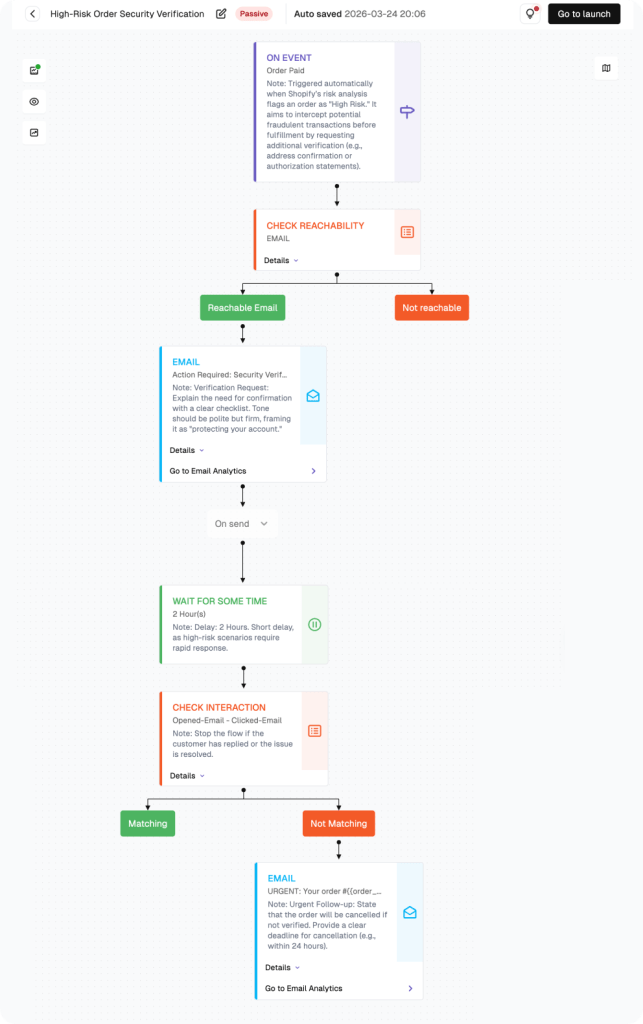
How to build this flow:
Use the steps below to build the flow in FosterFlow. Complete account setup and Shopify connection first if needed.
Navigate to the Flow Section
Click Flow in the left sidebar. Click Create flow to start a High-Risk Verification flow.
Configure the Trigger: High-Risk Order Event
Set the trigger to fire when Shopify risk level is High. Use the Order Placed trigger with an additional segmentation filter for risk level equals High, and coordinate with fulfillment so flagged orders are held before shipping.
Configure Email 1: Verification Request
Campaign name: High-Risk Verification Email 1. Subject: “Action required: please verify your recent order.” Use protective framing, keep the request simple, and include a direct reply or support option.
Add 24-Hour Wait + Condition
Add a 24-hour wait. Then add a condition: Has the customer verified? If yes — trigger fulfillment release and exit. If no — continue.
Configure Email 2: Final Request
Campaign name: High-Risk Verification Email 2. Subject: “Your order is still on hold — please verify within 24 hours.” Keep the tone respectful while making the deadline and cancellation policy clear.
Configure Cancellation + Launch
After the second 24-hour wait, if still unverified: trigger order cancellation in Shopify and send a brief cancellation notice. Click Go to launch.
PERFORMANCE & REVIEW
Core KPI Dashboard
After launch, review performance in FosterFlow to understand how the flow is affecting opens, clicks, replies, and conversions.
|
Metric
|
What it tells you
|
Target benchmark
|
|---|---|---|
|
Flagged Orders
|
Total orders entering this flow
|
Tracks fraud risk volume
|
|
Verification Rate
|
% of flagged orders successfully verified
|
≥60% (genuine customers)
|
|
Email 1 Open Rate
|
First verification request open rate
|
≥ 65%
|
|
Verification Speed
|
Average time to verify in hours
|
≤8 hours for genuine customers
|
|
Cancellation Rate
|
% of flagged orders cancelled due to non-verification
|
Track vs. fraud baseline
|
|
Chargeback Prevention
|
Estimated chargebacks avoided by this flow
|
Track revenue protection
|
Where to find it: open Flow, select the flow name, then review metrics in the list view and canvas header.
PERFORMANCE & REVIEW
Review Dimensions
Use these checks after the flow has collected at least two weeks of data.
Verification rate below 50%?
Your risk threshold may be too sensitive — review Shopify flagging criteria
The verification process may be too complicated — simplify to a single reply-to confirmation
Check if the email is reaching the inbox
Genuine customers complaining about the process?
Improve the protective framing — never let it sound accusatory
Reduce the number of verification steps required
Ensure the WhatsApp fast track is prominently featured
High cancellation rate?
Review whether Shopify high-risk threshold is calibrated correctly for your store
Some cancellations are expected and correct — track against actual chargeback rates
A/B test ideas:
|
Element
|
Variant A
|
Variant B
|
|---|---|---|
|
Verification method
|
Reply-to email confirmation
|
WhatsApp verification link
|
|
Email 1 urgency
|
Protective, no deadline
|
Please verify within 24h
|
|
ID request threshold
|
$500 order value
|
$300 order value
|
|
Subject line framing
|
Action required: verify your order
|
We need to confirm one thing
|
Summary
The High-Risk Order Verification Flow helps Shopify merchants reduce fraudulent chargebacks while keeping the experience fair for legitimate customers. Clear protective language, simple verification steps, and automatic follow-up help the store review risky orders before fulfillment.
Key outcomes:
· Triggers automatically when Shopify flags an order as high risk
· Fulfillment hold prevents fraudulent orders from shipping before verification
· Email 1: protective framing with fast-track verification options
· Email 2: final 24-hour warning before automatic cancellation
· Cancellation flow for non-responders protects against chargeback losses
Once configured, this FosterFlow email automation runs in the background, helping your team send timely customer messages without rebuilding the flow each time.
Ready to set this up?
Head to FosterFlow (fosterflow.ai), choose the matching Shopify email flow template, and tailor the copy to your brand voice.
3,000 total emails, up to 1,000 contacts, and no time limit.