
Campaign Teaser & Early Access
This warm-up flow is designed for major sales events (e.g., Black Friday / Cyber Monday) or specific holidays (e.g., Valentine’s Day, Mother’s Day). It builds anticipation and secures customer intent by offering ‘Sneak Peeks’ and ‘VIP Early Access.’ This is a manually triggered seasonal flow with flexible timing based on category needs — gift-oriented events require earlier activation.
When to Trigger?
|
Setting
|
Value
|
|---|---|
|
Trigger Type
|
Manual — Campaign launch
|
|
Trigger Condition
|
Manually activated ahead of a major sale or holiday event
|
|
Who enters
|
Active subscribers and customers (segmented by engagement tier)
|
|
When to start
|
7–14 days before the event (earlier for gift categories)
|
|
VIP Early Access
|
Top-tier customers receive Email 1 (early access) 48h before general launch
|
|
Exit condition
|
Customer makes a purchase during the campaign
|
Trigger logic:
Unlike automated flows, the Campaign Teaser is manually triggered for each event. Plan activation 7–14 days before the event for standard retail categories. For gift-oriented events like Mother’s Day or Valentine’s Day, activate 14–21 days before to allow time for delivery. Early access for VIP customers (top 10–20% by LTV) should be sent 48 hours before the general campaign launches.
Core Focus (Notes)
Below are some notes and tips for critical configuration decisions of this flow.
VIP Segmentation: Early Access Creates Urgency
Sending your best customers an early access email before the public launch accomplishes two things: it makes them feel exclusively valued, and it creates genuine scarcity for non-VIP customers when they see ‘some items already sold out.’ Configure a separate VIP segment for early access delivery.
Sneak Peek Email: Build Anticipation Without Revealing Everything
The first teaser email should show enough to excite — a hero product, a dramatic discount percentage, or a countdown timer — but withhold enough to drive the reader to open the next email. ‘Something big is coming Friday’ performs better than revealing the full sale details in Email 1.
Gift Categories Need Earlier Activation
For Mother’s Day, Valentine’s Day, or Christmas, customers need time to order, receive, and wrap their gift. Activate 14–21 days before these events. Include explicit last-order-for-delivery dates in the emails: ‘Order by [date] for guaranteed delivery before [holiday].’ This reduces last-minute order abandonment.
'It's Live' Email on Launch Day
Email 3 should arrive on the exact day the sale launches. Include a direct link to the sale landing page, the full discount details, and a countdown timer showing when the sale ends. This is the highest-converting email in the sequence.
Add to Cart Early — Checkout on Launch Day
In the teaser emails, invite customers to add items to their cart early. On launch day, you can send a cart abandonment email to customers who pre-loaded their cart but have not yet checked out — combining two flows for maximum conversion.
Flow Architecture

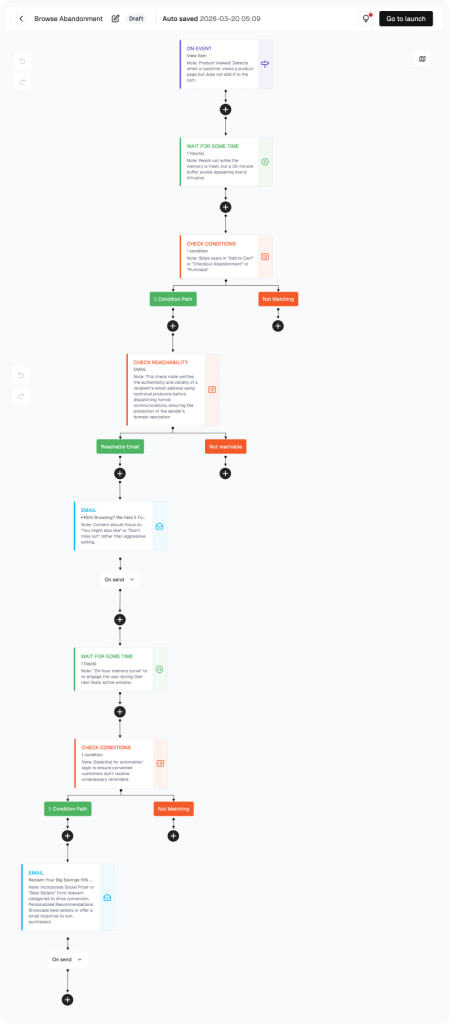
How to build this flow:
Steps cover the flow canvas setup. Account setup is in the Help Center.
Navigate to the Flow Section
Click “Flow” in the left sidebar. Click “Create flow” to start a Campaign Teaser flow. Name it clearly: e.g., “BFCM 2026 Teaser Flow.”
Segment Your Audience: VIP vs. General
Before activating, create two segments in FosterFlow: (1) VIP customers — top 10–20% by LTV. (2) General subscribers. The VIP segment receives Email 1A (early access). The general segment starts at Email 2.
Configure Email 1A: VIP Early Access
Campaign name: “Campaign Teaser — VIP Early Access.” Subject: “You’re in — 48-hour exclusive preview.” Show the hero product or top discount. Include a unique early-access link. Send to VIP segment only.
Configure Email 2: Main Teaser
Campaign name: “Campaign Teaser — Main Teaser.” Subject: “Something big is happening [day/date].” Show a preview — countdown timer, teaser image, hint at the discount. Do not reveal full details yet.
Configure Email 3: Launch Day
After the first welcome email, do not send the next one right away. Give your new subscriber time to read the email, browse your store, and maybe use their discount.
Click the wait step node. The panel shows “Wait for Some Time.” Set the wait time to 2 days. A note in the panel explains: “Allow 48 hours for the user to browse and apply their discount.”
This 48-hour gap is a sweet spot for most welcome email series. It gives enough time for the subscriber to act, but not so much time that they forget about you.
Add a Condition Check: Did They Purchase?
Campaign name: “Campaign Launch.” Subject: “It’s live — [X]% off everything, today only.” Full discount details, direct sale link, end date countdown. This is your highest-converting email — make it unmissable.
Set Timing and Activate
Schedule Email 1A to VIPs 48 hours before launch. Schedule Email 2 to all subscribers 2–3 days before launch. Schedule Email 3 to launch on the event day. Click “Go to launch” and set the scheduled send times.
PERFORMANCE & REVIEW
Core KPI Dashboard
Monitor in FosterFlow → Flow List after activation.
|
Metric
|
What it tells you
|
Target benchmark
|
|---|---|---|
|
Send Count — Email 1A
|
VIP early access emails sent
|
Tracks VIP segment size
|
|
Open Rate — Email 1A
|
VIP early access open rate
|
≥ 55%
|
|
Open Rate — Email 2
|
Main teaser open rate
|
≥ 35%
|
|
Open Rate — Email 3
|
Launch day open rate
|
≥ 45%
|
|
Click Rate — Email 3
|
Campaign landing page CTR
|
≥ 18%
|
|
Campaign Conversion Rate
|
% of email recipients who purchase during the campaign
|
8%–20%
|
|
Revenue per Email Sent
|
Total campaign revenue / total emails sent
|
Track per campaign
|
Where to find it: Flow section → click flow name → metrics in the list and canvas header.
PERFORMANCE & REVIEW
Review Dimensions
Use after the flow has run for at least 2 weeks.
Low VIP early access open rate?
Verify your VIP segment is correctly defined — check LTV threshold
The subject line must clearly signal exclusivity and urgency
Ensure the early access link is functional and points to a live page
Email 3 open rate lower than Email 2?
Launch day inboxes are competitive — all brands are sending simultaneously
Test sending Email 3 at an off-peak time (e.g., 7am or 9pm instead of noon)
A/B test the subject line: ‘It’s live’ vs. the specific discount percentage
High click rate but low conversion on launch day?
Is the sale landing page loading fast enough on mobile?
Are discount codes applying automatically at checkout?
Check inventory — are featured products in stock?
A/B Test Opportunities:
|
Element
|
Variant A
|
Variant B
|
|---|---|---|
|
Email 2 reveal level
|
Tease only (no specific discount)
|
Reveal % off, hide products
|
|
Email 3 send time
|
9am local time
|
7am local time
|
|
VIP early access window
|
48 hours before launch
|
24 hours before launch
|
|
Countdown timer
|
Included in all emails
|
Email 3 only
|
Summary
The Campaign Teaser & Early Access Flow transforms seasonal events from one-day blasts into multi-touch experiences that build anticipation, reward VIP customers with genuine exclusivity, and maximize revenue on launch day. The sequential reveal strategy keeps subscribers engaged across all three emails without exhausting their attention.
What this flow delivers:
· Manually triggered 7–14 days before the event (earlier for gift categories)
· VIP early access email sent 48 hours before general launch
· Email 2: suspense-building teaser with countdown timer
· Email 3: full campaign launch on event day — highest-converting email in the sequence
· Cart pre-loading strategy bridges this flow with cart abandonment recovery
This flow runs automatically with zero manual effort.
Ready to set this up?
Head to FosterFlow (fosterflow.ai) and activate this flow in minutes.
3,000 emails/month, up to 1000 contacts, no credit card required.