
Add to Cart Abandonment Recovery
This flow targets users who added items to their cart but have not yet proceeded to the checkout process. By delivering timely automated reminders, it rekindles purchase intent during the ‘golden window’ while ensuring high-intent checkout abandoners are skipped to avoid over-communication.
When to Trigger?
|
Setting
|
Value
|
|---|---|
|
Trigger Type
|
On Event
|
|
Trigger Event
|
Add to Cart
|
|
Who enters
|
Users who added items to cart but did not begin checkout
|
|
When it fires
|
1 hour after cart add with no checkout activity
|
|
Priority protection
|
Users already in Checkout Abandonment flow are skipped
|
|
Exit condition
|
User begins checkout or completes a purchase
|
Trigger logic:
Add to cart is a strong purchase intent signal — stronger than a product view but weaker than starting checkout. The 1-hour wait filters out users who are still actively shopping. The priority filter ensures checkout abandoners (higher intent) are never interrupted by this lower-level flow.
Core Focus (Notes)
Here are some tips for you to learn and use while using this flow.
The Golden Window: Act Within 1 Hour
Cart abandonment recovery is most effective within the first 1–3 hours. After 24 hours, conversion rates drop significantly. Configure the trigger to fire Email 1 within 1 hour of the cart add event (with no checkout initiated). The longer you wait, the colder the lead.
Skip Checkout Abandoners — Always
A user who has started checkout is already in a higher-intent, higher-value flow. Sending a cart abandonment email to someone who has already begun checkout is redundant and risks confusing them. The condition check must verify: ‘Has the user NOT started checkout?’ before proceeding.
Email 1: Remind, Don't Pressure
The first email should feel like a friendly reminder, not a sales alarm. Show the exact cart contents — product name, image, price. A single CTA: ‘Return to your cart.’ No discount yet. Save the incentive for Email 2 if they still have not converted.
Email 2: Introduce an Incentive
If the user has not checked out after 24 hours, the barrier is likely price or indecision. Offer a time-limited discount or free shipping to reduce friction. Make the deadline real — ‘Your cart is saved, and this offer expires in 24 hours’ performs better than vague urgency.
Cart Content Personalization
Always dynamically pull the actual cart items into the email — product name, image, and price. A generic ‘You left something behind’ email without the specific product details underperforms by 40%+ compared to personalized cart content emails.
Flow Architecture
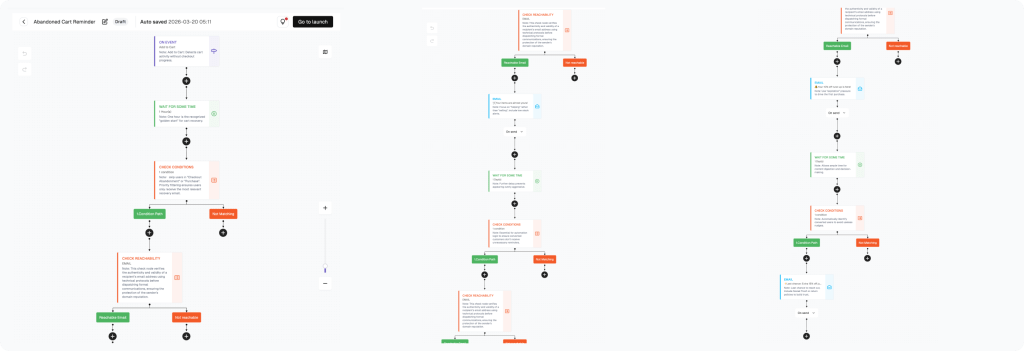
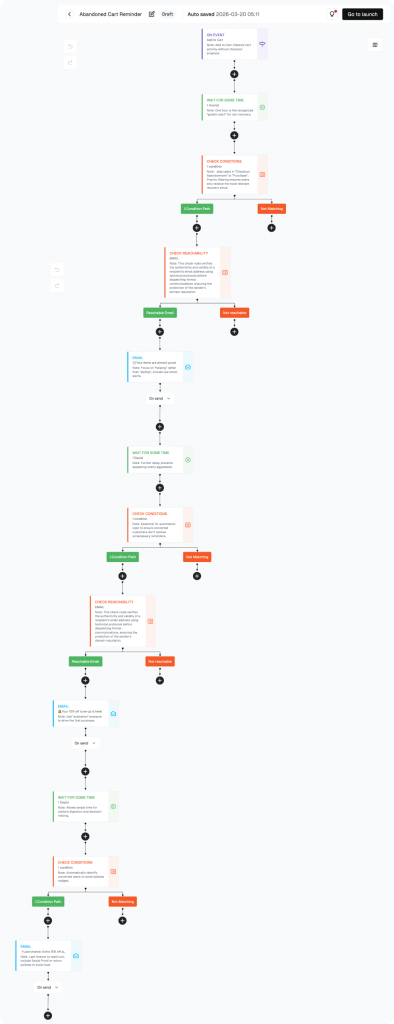
How to build this flow:
Steps below cover the flow canvas setup. Account setup and Shopify connection are in the Help Center.
Navigate to the Flow Section
Click “Flow” in the left sidebar. Click “Create flow” to start a Cart Abandonment flow.
Configure the Trigger: On Event — Add to Cart
Set Trigger Type to “On Event” and select “Add to Cart.” Optionally filter by minimum cart value to focus on higher-value abandoners.
Add a Wait Step: 1 Hour
Add a wait node set to 1 hour. This prevents the email firing while the user is still actively browsing or building their cart.
Add Condition: Has User Started Checkout or Purchased?
Add a condition node: Checkout Started or Total Purchase Amount > $0 in last 1 hour. Users who have progressed exit silently.
Configure Email 1: Cart Reminder
Campaign name: “Cart Abandonment Email 1.” Subject: “You left something behind — your cart is saved.” Dynamically pull cart product name, image, and price. Single CTA: “Return to cart.”
Add Wait + Condition for Email 2
Add a 24-hour wait. Then add a condition: Has the user checked out or purchased? If yes — exit. If no — continue.
Configure Email 2: Incentive Offer
Campaign name: “Cart Abandonment Email 2.” Subject: “Your cart is waiting — and here’s a little extra.” Offer a discount code or free shipping with a real expiry time. Then click “Go to launch.”
PERFORMANCE & REVIEW
Core KPI Dashboard
Monitor in FosterFlow → Flow List after activation.
|
Metric
|
What it tells you
|
Target benchmark
|
|---|---|---|
|
Send Count
|
Total cart abandonment emails sent
|
Tracks cart abandonment volume
|
|
Open Rate — Email 1
|
Cart reminder open rate
|
≥ 40%
|
|
Open Rate — Email 2
|
Incentive email open rate
|
≥ 30%
|
|
Click Rate — Email 1
|
Cart return rate
|
≥ 10%
|
|
Click Rate — Email 2
|
Discount redemption click rate
|
≥ 12%
|
|
Recovery Rate
|
% of abandoners who complete purchase
|
5%–15%
|
Where to find it: Flow section → click flow name → metrics in the list and canvas header.
PERFORMANCE & REVIEW
Review Dimensions
Use after the flow has run for at least 2 weeks.
Open Rate on Email 1 below 35%?
Check the subject line — mention the cart or specific product for better relevance
Verify the trigger is firing at the right time (1 hour after add to cart)
Check domain authentication and spam filters
High click rate but low purchase completion?
Is the cart page loading correctly on mobile?
Is the discount code in Email 2 applying automatically at checkout?
Consider adding a direct checkout link instead of a cart link
High exit rate at the condition check?
Users are progressing to checkout — this is good. Monitor the Checkout Abandonment flow for the next step.
A/B Test Opportunities:
|
Element
|
Variant A
|
Variant B
|
|---|---|---|
|
Email 1 timing
|
1 hour after cart add
|
2 hours after cart add
|
|
Email 1 CTA
|
'Return to your cart'
|
'Complete your purchase'
|
|
Email 2 incentive
|
10% discount code
|
Free shipping
|
|
Email 2 urgency
|
'Offer expires in 24h'
|
'Your cart expires in 48h'
|
Summary
The Cart Abandonment Recovery Flow captures one of the highest-value moments in the customer journey — when intent is clear but the purchase is incomplete. A well-timed reminder followed by a targeted incentive recovers a meaningful portion of would-be lost revenue automatically.
What this flow delivers:
· Trigger fires 1 hour after add to cart with no checkout activity
· Priority check skips users already in the Checkout Abandonment flow
· Email 1: personalized cart reminder with no pressure
· Email 2: time-limited discount or free shipping to close the sale
· Automatic exit when user begins checkout or purchases
This flow runs 24/7 with zero manual effort.
Ready to set this up?
Head to FosterFlow (fosterflow.ai) and activate this flow in minutes.
3,000 emails/month, up to 1000 contacts, no credit card required.