
How to Sync Customer Segments Between Shopify and Email Tools
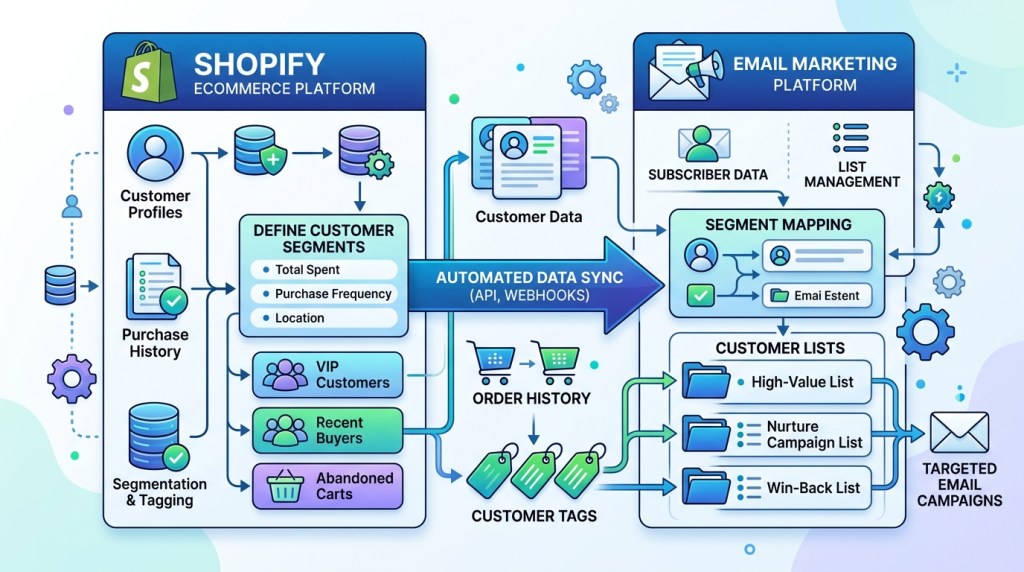
You have a perfectly crafted email campaign ready to go — personalized subject lines, relevant product recommendations, the right discount for the right customer. Then you realize: your segments are two days out of date. The customer tagged “first-time buyer” placed a second order yesterday. The “at-risk” segment still includes someone who bought an hour ago.
Stale segments don’t just waste your effort — they erode customer trust. Shopify customer segment email sync is the infrastructure that makes personalization actually work. This guide covers why it matters, what data you need to sync, how sync works in practice, and how to avoid the most common failures.
Why Segment Sync Is the Foundation of Personalized Email

Most merchants understand segmentation in theory. They know they shouldn’t send the same email to a first-time buyer and a loyal VIP customer. But understanding segmentation and executing it reliably are two different challenges.
The execution problem is almost always a sync problem.
What breaks without real-time sync:
- A win-back email reaches a customer who purchased 6 hours ago
- A “first purchase” discount is sent to someone on their third order
- A VIP reward flow skips a customer who just crossed the spending threshold — because your email tool hasn’t pulled the update yet
- Abandoned cart reminders fire for customers who completed checkout on mobile while your email system still shows their cart as open
According to Salesforce research, 74% of customers feel frustrated when marketing content is irrelevant to them. Irrelevance is almost always a data freshness issue.
Manual vs. Automatic Sync: The Trade-offs
There are two approaches to keeping Shopify segments aligned with your email tool.
Manual Sync
Manual sync means periodically exporting a customer list from Shopify and importing it into your email platform — either as a CSV file or through a scheduled bulk operation.
Pros:
- No third-party integration required
- Works with virtually any email tool
- Simple to understand and audit
Cons:
- Data is always stale by definition — even a daily sync means 23+ hours of lag
- Error-prone (export the wrong columns, miss a filter, and your segments break)
- Labor-intensive at scale — a store with 50,000+ customers can’t maintain manual sync realistically
- No behavioral data (like browse activity) is captured this way
Manual sync works for stores sending one or two monthly campaigns to broad audiences. It falls apart the moment you need triggered automation or behavioral targeting.
Automatic (Real-Time) Sync
Automatic sync uses a direct API connection between Shopify and your email tool to push customer data updates the moment they happen.
Pros:
- Segments reflect current customer state at send time
- Behavioral triggers (cart additions, page views, purchases) can fire automations within minutes
- No manual work once the integration is configured
- Scales with store growth
Cons:
- Requires a compatible email platform with native Shopify integration
- Initial setup takes more time than a CSV export
- Sync errors can be harder to diagnose without proper logging
For any store running automation — abandoned cart, welcome series, post-purchase — real-time sync is not optional. It’s the baseline.
What Data Should You Actually Sync?

Not all customer data is equally useful for segmentation. Here’s what matters most and what each data type enables:
Purchase History
- Total lifetime value (LTV)
- Number of orders
- Days since last purchase
- Average order value
- Specific products or categories purchased
What it unlocks: VIP tiers, win-back flows, cross-sell recommendations, loyalty incentives, RFM (recency/frequency/monetary) segmentation.
Customer Tags
Shopify lets you apply custom tags to customers — manually or through automation tools. Tags like vip, wholesale, influencer, at-risk, or repeat-buyer can drive highly targeted flows.
What it unlocks: Any logic that requires custom classification outside Shopify’s default fields.
Behavioral Data
- Products viewed (browse history)
- Collections browsed
- Time spent on product pages
- Cart additions and removals
- Email engagement (opens, clicks, unsubscribes)
What it unlocks: Browse abandonment flows, interest-based segmentation, send-frequency optimization, re-engagement targeting.
Geographic and Device Data
- Country, city, timezone
- Device type (mobile vs. desktop)
- Traffic source (organic, paid, referral)
What it unlocks: Timezone-based send optimization, mobile-specific messaging, source-based welcome variants.
How FosterFlow Handles Real-Time Sync
FosterFlow is built as a Shopify-native app, which means it reads directly from the Shopify data layer rather than relying on scheduled API polls or third-party middleware.
What this means in practice:
When a customer places an order, their profile inside FosterFlow updates in real time — purchase count, LTV, last order date, purchased products, and any tags applied by Shopify Flow or third-party apps. Segment membership recalculates automatically.
So if you’ve built a segment called “Two-Time Buyers,” and a customer places their second order at 2:14 PM, they enter that segment at 2:14 PM — not at the next scheduled sync at midnight. Any flow triggered by that segment membership fires immediately.
FosterFlow also captures behavioral signals — product page views, cart additions, email clicks — without requiring a separate tracking pixel setup. These signals feed directly into segmentation and automation logic.
For merchants migrating from a tool with delayed sync, this difference is immediately visible in abandoned cart recovery rates and post-purchase flow performance.
Common Sync Errors and How to Fix Them

Even with a native integration, sync can fail in predictable ways. Here’s what to watch for:
Problem: Customers Missing from Segments
Likely cause: A filter condition references a data field that wasn’t populated at account creation (e.g., a customer signed up before you started collecting phone numbers, so they’re excluded from an SMS segment).
Fix: Audit your segment criteria for fields with incomplete historical data. Either broaden criteria or build a backfill logic.
Problem: Duplicate Profiles
Likely cause: A customer purchased as a guest and later created an account with the same email. Shopify creates separate records; some integrations don’t merge them.
Fix: Check your email tool’s deduplication logic. Most native integrations handle this by email address as a unique identifier, but verify this in your settings.
Problem: Tags Not Syncing
Likely cause: Tag sync is often a separate permission from basic customer data sync. Some integrations require explicit permission grants for tag read/write.
Fix: Review your Shopify app permission scopes. Confirm the app has read_customers and write_customers permissions.
Problem: Win-Back Emails Reaching Recent Buyers
Likely cause: The win-back flow’s trigger checks “days since last purchase” at flow entry time, but doesn’t re-check before each send. A customer who entered the flow 60 days ago and then purchased won’t be suppressed.
Fix: Add a condition check at each email step — not just at flow entry — that confirms the customer still meets the “no recent purchase” criteria before sending.
Problem: High Bounce Rates After Segment Export
Likely cause: An old, unvalidated list was synced. Addresses that have hard-bounced previously were re-imported without a suppression check.
Fix: Always cross-reference new imports against your existing suppression list. A native integration handles this automatically; manual imports require a manual check.
A Practical Sync Checklist
Before launching any new segmented campaign or automation:
- [ ] Confirm your integration has real-time (not batched) sync enabled
- [ ] Verify that suppression lists (unsubscribes, bounces, spam complaints) are bidirectionally synced
- [ ] Check that customer tags from Shopify are flowing into your email tool
- [ ] Confirm behavioral data (browse, cart, purchase) is captured and up to date
- [ ] Test segment membership by manually checking a known customer’s profile in both Shopify and your email tool
- [ ] Set up exit conditions in all automation flows to prevent recently-purchased customers from receiving irrelevant messages
The Business Case for Getting This Right
Segment sync isn’t a technical nice-to-have — it directly impacts revenue. Properly synced, behavior-driven segments consistently outperform broadcast campaigns by a significant margin:
- Segmented campaigns generate 760% more revenue than non-segmented equivalents (Campaign Monitor)
- Real-time behavioral triggers convert at 3–5x the rate of time-based triggers
- Suppression failures (sending to recently-purchased customers) increase unsubscribe rates by an average of 2–4x
The infrastructure investment is modest. The return is not.
Sync Once, Personalize Forever
Getting your Shopify customer segments in sync with your email platform is a one-time setup that compounds in value indefinitely. Every automation you build, every campaign you send, performs better when it’s working from accurate, real-time data.
FosterFlow’s native Shopify integration handles real-time sync automatically — purchase history, behavioral data, tags, and suppression — so your segments are always current and your automations always send to the right people at the right time.
Install FosterFlow on the Shopify App Store and sync your segments today →